Unity Basics
Game engine
a software framework used to develop and create spatial applications such as video games
- game engines include tools for graphics rendering, physics simulation, audio management, scripting, animation, AI, networking, user interfaces, asset management, input handling, etc.
- Unity is cross-platform (iOS, Android, Windows, etc.)
- Unity also is a great tool for fast prototyping and research projects
- Unity has a huge marketplace for 3D models, assets and other tools
Unity editor interface
- Scene view with objects of the game
- Tool bar to manipulate position, scale and rotation of the objects
- Hierarchy of the objects
- Game object inspector showing object components
- Project assets at the bottom
GameObject-Component model
- everything is a game object, but they do nothing on their own
- a game object is a container for components
- components add behavior (e.g. Transform, Renderer, Collider, Rigidbody (physics), Scripts (MonoBehaviour))
Unity scripts
- similar to Arduino
void Start()instead ofvoid setup()void Update()instead ofvoid loop()| called every frame | avoid blocking loops here- when dealing with physics, we want fixed updates (fixed timespan between updates)
- to achieve this, we keep track of time passed between frames and calculate the update accordingly, the simplest way is using
void FixedUpdate()andTime.fixedDeltaTime - e.g.
rb.velocity = direction.normalized * (speed * Time.fixedDeltaTime)
void Awake()called when script instance is loaded (before application start)void LateUpdate()called after allUpdatefunctions have been calledvoid OnCollisionEnter()|void OnTriggerEnter()called upon physics collisions (where one of the objects hasCollider.isTriggerenabled)OnDestroy()called when GameObject is destroyed
using UnityEngine;

public class Script : MonoBehaviour
{
    // Start is called before the first frame update
    void Start()
    {
    }

    // Update is called once per frame
    void Update()
    {
    }
}
Prefab
a template that allows fully configured GameObjects to be saved in the project for reuse and instantiation at runtime
Instantiate(Prefab, Position, Rotation);- e.g.
Instantiate(myPrefab, new Vector3(0, 0, 0), Quaternion.identity)
Tags
a tag is a word which you link to one or more GameObjects we can use them to write script code to find or identify GameObjects by their tag
Non-player character (NPC)
character in a game that is not controlled by a player
DualPanto Toolkit
Guided tour
when the user enters a new stage or document pause the interaction, then
- traverse the most relevant objects in the scene
- using the it (maybe also me) handle and speech output
GameManager.cs
central script to control the flow of your game or app
- recommended for every app
examples:
async Task StartGame()
{
	// ...
	await _lowerHandle.SwitchTo(sb, 50.0f);
	_upperHandle.Free();
}

async Task RenderObstacle()
{
	pantoColliders = GameObject.FindObjectsOfType<PantoCollider>();
	foreach (PantoCollider collider in pantoColliders)
	{
		collider.CreateObstacle();
		collider.Enable();
	}
}
Level.cs
- takes care of level introductions
// ...
GetPantoGameObject().GetComponent<LowerHandle>().Free();
GetPantoGameObject().GetComponent<UpperHandle>().Free();
Asynchronous programming
a means of parallel programming in which a unit of work runs separately from the main application thread
- and notifies the calling thread of its completion, failure or progress
Toolkit scripts
- Panto Box Collider: Renders collider (wall) on DualPanto
- Me Handle: Mapping player (object) to me handle
// ...
transform.position = (upperHandle.HandlePosition(transform.position));
// ...
Toolkit functions
SwitchTo(gameObject, speed): Moves the handle to the given GameObject at the given speed (using iterative method); the handle will follow this object, untilFree()is called or the handle is switched to another objectMoveToPosition(position, ...): Moves the handle to the given position at the given speed; the handle will then be freed (= user controlled) if argshouldFreeis true- helps inventing own interactions like recoil
speechOut.Speak(string): utilizes Text-to-Speech capabilities of respective operating system- works asynchronously, so you can await it before sending the next command
using SpeechIO;
SpeechOut speechOut = new SpeechOut();
speechOut.SetLanguage(SpeechBase.LANGUAGE.ENGLISCH) // alternatively GERMAN or JAPANESE
await speechOut.speak("Hello world!")
Text-to-Speech (TTS)
allows you to generate speech output at runtime
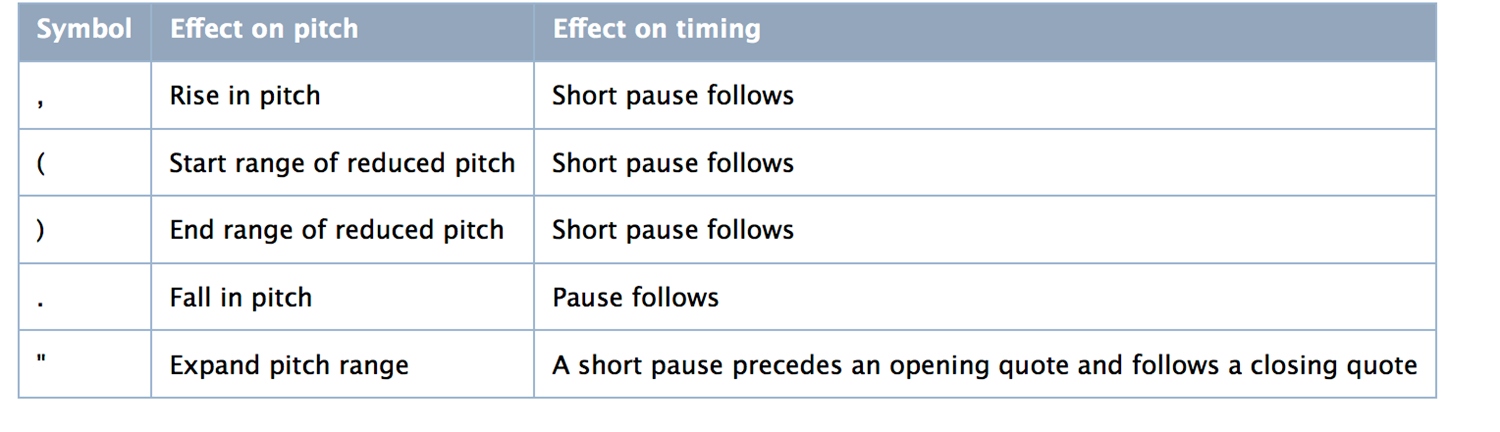
task[0] = speechOut.Speak(objectOfInterest.description)Speech Synthesis Markup Language (SSML)
a markup language to represent intonation in written symbols text-to-speech follows intended intonation
- in the end, recording your own voice gets you more expressive results in less time don’t obsess getting the intonation right
Sonification
to map data to sound in order to allow listeners to interpret it in an auditory manner
Example: ball prefab
async void OnCollisionEnter(Collision other)
{
	// ...
	if (other.collider.CompareTag("Player")) {
		soundEffects.PlayPaddleClip();
		// ...
	}
	// ...
}
Example: Player collision
- add Audio Source component to Player object
- add the following scripts to Player object
public class PlayerSoundEffect : MonoBehaviour {
	public AudioClip gameOverClip; // selectable in editor
	public AudioClip collisionClip; // selectable in editor
	public float maxPitch = 1.2f; // selectable in editor
	public float minPitch = 0.8f; // selectable in editor
	private AudioSource audioSource;

	void Start()
	{
		audioSource = GetComponent<AudioSource>(); // get audio source component from player object
	}

	public float playerFellDown()
	{
		audioSource.PlayOneShot(gameOverClip);
		return gameOverClip.length;
	}

	public void playHit()
	{
		PlayClipPitched(collisionClip, minPitch, maxPitch);
	}
}public class PlayerController : MonoBehavour
{
private PlayerSoundEffects soundEffects;
private bool playerFellDown;
void Start()
{
soundEffects = GetComponent<PlayerSoundEffect>(); // references the class in the script above
}
void Update()
{
if (transform.position.x * ... > 14.5 * 14.5ff && !playerFellDown) // ignore first comparison, use case specific
{
playerFellDown = true;
float clipTime = soundEffects.PlayerFellDown();
Destroy(gameObject, clipTime); // wait for sound to play, then destroy player object
}
}
void OnCollisionEnter(Collision collision)
{
GameObject other = collision.gameObject;
if (other.CompareTag("Enemy"))
{
soundEffects.PlayHit();
}
}
}Foley recording
the reproduction of everyday sound effects like swishing of clothing, footsteps, squeaky doors or breaking glass (named after Jack Donovan Foley)
Speech input (speech recognition / speech-to-text)
in the speech plugin is also a SpeechIn class, which deals with voice recognition again using your own OS (Windows + MacOS)
- for DualPanto, we wanted speech input to work offline, reliable and “fast” we thus opted for an OS based approach
Only really good with a known (small) vocabulary / context:
using SpeechIO;
SpeechIn speechIn = new SpeechIn(onRecognized); // initialization with callback
speechIn.startListening(); // in void Start()
string result = await speechIn.Listen(new string[] { "boom", "jump", "hide"});
speechIn.stopListening(); // in void OnApplicationQuit()
For bad microphones or noisy rooms, provide alternative like keyboard (or foot switch):
string result = await speechIn.Listen(new Dictionary<string, KeyCode>() {
    { "yes", KeyCode.Y },
    { "no", KeyCode.N }
});
For longer / more complex dialogs:
- define a grammar, write a parser, put vocabulary from a data file (like in a text adventure game)