Encoders and Motors
- 14 bit digital encoders (rotation)
- ESP32 (15x faster CPU and 250x more RAM than Arduino Nano)
- pins: ESP32 has 20 GPIO (General purpose input / output) pins, but we need to control:
- 6 encoders (2 pins each for high resolution)
- 6 motors (2 logic pins each)
- total of 24 pins needed
PC to Microcontroller
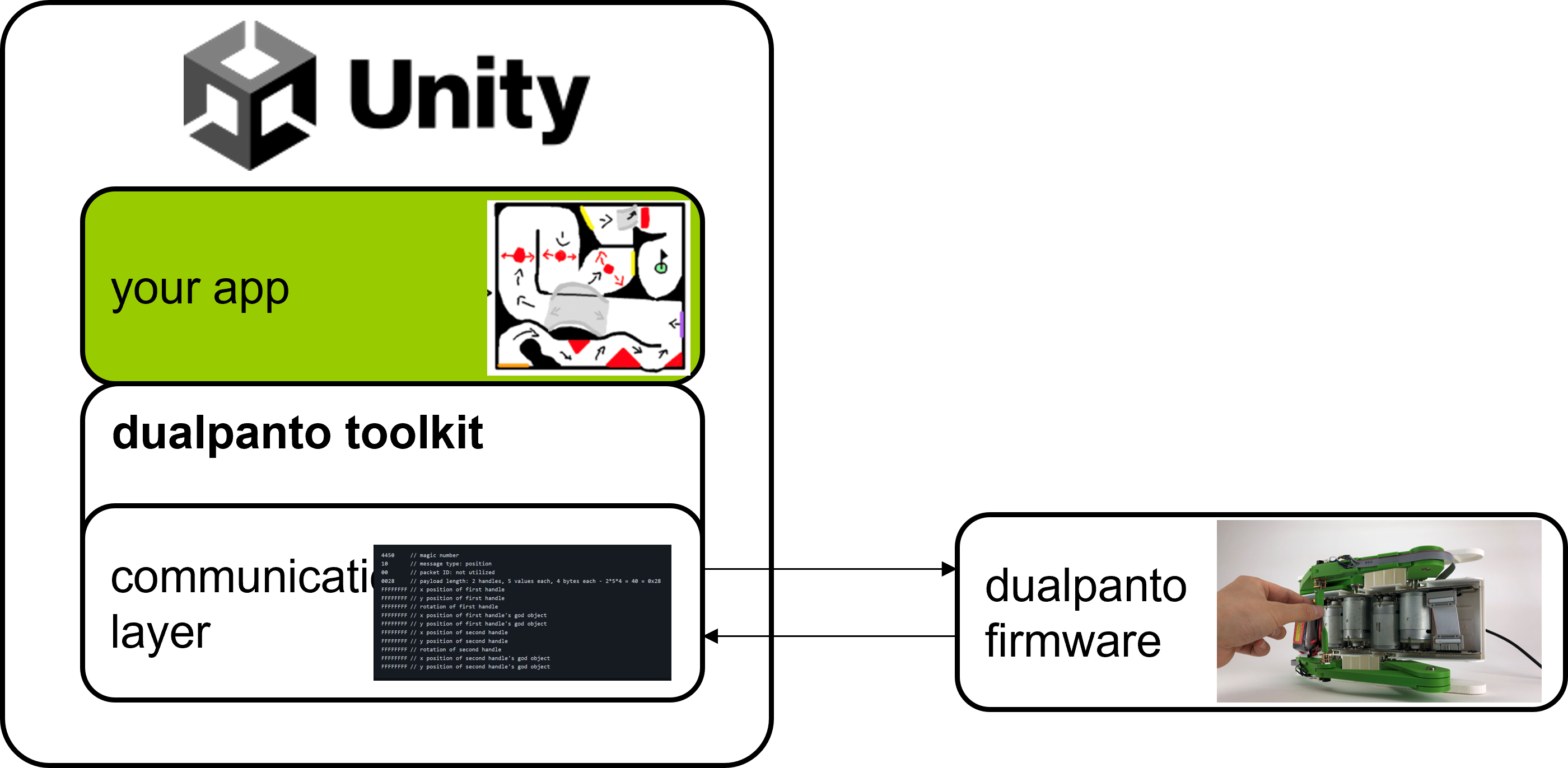
- Communication layer in C: high-speed (1kHz)
- USB: lag of about 15 - 50ms
- Microcontroller: reaction time < 1ms (1000fps), necessary for haptics, runs own firmware
Serial communication
Sending data one bit at a time over a wire
- often additional pins used for meta communication (ready, received, cleared etc.)
- master (e.g. PC) initializes communication, not real-time, no high-throughput
- Baudrate: rate at which bits are transferred through a serial connection (9600 baud = 9600 bit/s), choice of common values due to crystal oscillators (7.3728 MHz)
- the higher the rate, the more time the other side has to invest into reading
Serial Peripheral Interface (SPI)
communication interface used for full duplex (both directional) short-distance communication in embedded systems using master-slave architecture
- pins: SlaveSelect (SS), SerialClock (SC), MasterOutSlaveIn (MOSI), MasterInSlaveOut (MISO)
- see Datasheet for component-specific SPI-implementation
- e.g.
x000forNOP,x3FFFforangle(rotary position encoder)
- e.g.
void setup() {
  settings = SPISettings(1000000, MSBFIRST, SPI_MODE1);
  pinMode(_cs, OUTPUT);
}

void loop() {
  SPI.begin();
  SPI.beginTransaction(settings);
  digitalWrite(this->_cs, LOW);
  SPI.transfer16(0b10000000 | 0x3FFF); // the register that holds the value
  digitalWrite(this->_cs, HIGH);
  delay(50); // esp32 spec tells us that this is the right SPI delay
  digitalWrite(this->_cs, LOW);
  uint16_t response = SPI.transfer16(0x00); //send a NOOP
  digitalWrite(this->_cs, HIGH);
  SPI.endTransaction();
}
vs. using a library:
#include <AS5048A.h>

void setup()
{
  angleSensor.begin();
}

void loop()
{
  float val = angleSensor.getRotationInDegrees();
}
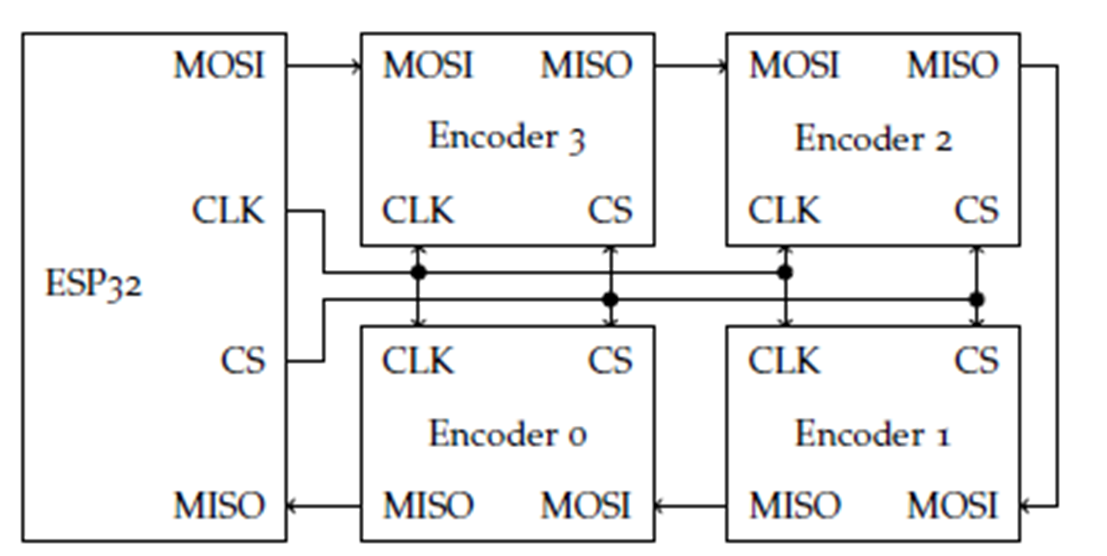
Daisy chain configuration
multiple devices that transfer signals through a chain, allowing communication to pass through by adding latency and saving pins
- hand trough instruction to each device (using clock)
- execute instruction on all devices synchronously (using chip select)
- hand through results whilst repeating step 1 (using clock)
DualPanto Communication protocol
DualPanto PC:
- handlePosition
- godObject Position
- etc.
PC DualPanto:
- create Obstacle
- remove Obstacle
- modify Obstacle
- freeze Handle
- free Handle
- move itHandle
- etc.
Implementation:
- JSON has lots of unnecessary symbols and identifiers (e.g. 618 byte message for 42 bytes of content) + needs parsing
- Information density: How many bits of pure information are in a message of a given length (the higher the density, the more efficient the communication)
- Idea: just send raw values, but where does a transmission start?
- Magic byte: A constant value used to identify a point in a protocol communication e.g. the start of a package (e.g. 4450 for DP in ASCII)
- additionally we enumerate
MessageTypeusing 2 bytes
Example Message Types:
POSITION: transfers all handle positionsHEARTBEAT: to make sure, that DualPanto is still connectedDEBUG_LOG: transfers custom debug message (uses parameter to transfer payload length | variable)
Extra: JavaScript communication syntax
const type = message.message.at(2) as number;

switch (type) {
	case MessageType.Sync:
		this.sendDebug("received: sync");
		// send SyncAck message
		this.sendMessage(new Uint8Array([
			0x44, 0x50, 0x80, 0x00, 0x00, 0x00
		]));
		break;

	case MessageType.Heartbeat:
		// TODO BIS handle the heartbeat by send the correct response
		// TODO BIS read the protocol definition here
		// TODO BIS https://github.com/HassoPlattnerInstituteHCI/dualpantoframework/blob/BIS/documentation/protocol/protocol.md
		// TODO BIS look at the MessageType.Sync to get an idea
		this.sendDebug("received: hearbeat");
		// send HeartbeatAck message
		this.sendMessage(new Uint8Array([
			0x44, 0x50, 0x81, 0x00, 0x00, 0x00
		]));
		break;

	// TODO BIS handle debug messages here
	case MessageType.DebugLog:
		const msg = message.message.subarray(6, message.message.length);
		this.sendDebug(HandlePantoMessage.bytesToStringMsg(msg));
		break;

	case MessageType.InvalidData:
		console.error("received: invalid data");
		break;

	case MessageType.Position:
		const x1 = message.message.subarray(6, 10);
		const x = new DataView(new Uint8Array(x1).buffer).getFloat32(0);
		// TODO BIS parse y the same way as x
		const y1 = message.message.subarray(10, 14);
		const y = new DataView(new Uint8Array(y1).buffer).getFloat32(0);
		const minX = -80;
		const maxX = 140;
		const minY = -16;
		const maxY = -180;
		const clampedX = HandlePantoMessage.lerpAndClamp0to1(x, minX, maxX);
		const clampedY = HandlePantoMessage.lerpAndClamp0to1(y, minY, maxY);
		this.setPosition(clampedX, clampedY);
		//console.log(`[HandlePantoMessage] x: ${clampedX}, y: ${clampedY}`);
		break;
	default:
		console.error("message not understood: " + HandlePantoMessage.bytesToStringMsg(message.message));
}
Libraries, Toolkits, Frameworks
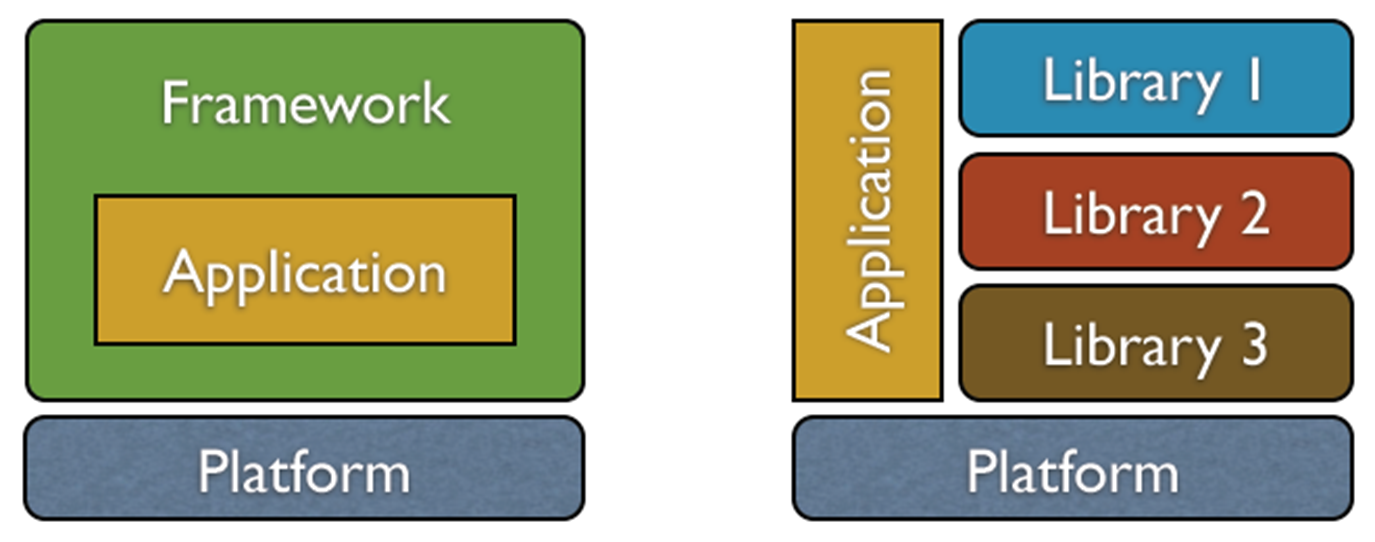
Library: collection of implementations of behavior, written in terms of a language, that has a well-defined interface by which the behavior is invoked
- short: collection of implementations
Framework: abstraction in which software, providing generic functionality, can be selectively changed by additional user-written code
- short: generic application where code is selectively changed
- Unity is a framework
Toolkit: library or collection of libraries with a specific purpose, today often used in the context of graphical user interfaces (GUIs)
- short: collection of libraries with a specific purpose
- DualPanto toolkit is a toolkit designed for use in Unity
Library design
Principle of least astonishment: a system should behave in a way that most users will expect it to behave
Pareto principle: for many outcomes, roughly 80% of consequences come from 20% of causes
- frequent use cases short syntax | rare use cases long syntax
- that way you handle 80% of the use cases with 20% effort
Leaky abstraction: an abstraction that leaks details that it is supposed to abstract away
- Joel Spolsky: “all non-trivial abstractions, to some degree, are leaky”
- e.g. row-wise vs. column-wise iteration over pixels in image library
- solution: provide optional parameter to the user (“get out of jail”)
- stay as close to original language as possible (no need to lern new “syntax”)
Documentation
- why should the library be used
- how to install
- how to check, if it works (simple examples)
Auto-generated documentation: more readable and accessible than documentation in code + always up to date
Online coding environment + examples: alterable demo for users, copy-paste examples for users, stable bug report environment
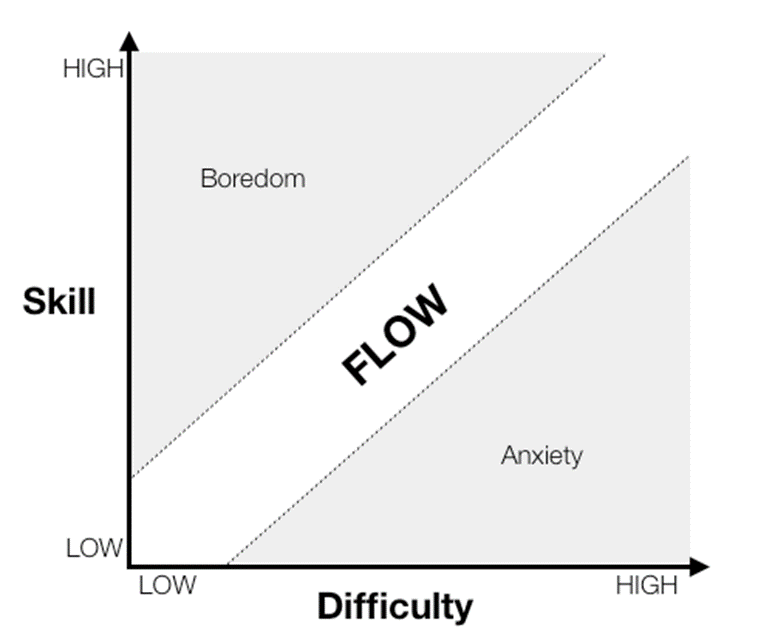
Flow
mental state in which a person performing some activity is fully immersed in a feeling of energized focus, full involvement, and enjoyment
- ask yourself: how can I make learning a library fun?
Choosing a library
- more downloads better
- higher version better
- more recently maintained better
- developed / supported by big brands better
- research meta-data, opinion articles, StackOverflow discussions, do small experiments using possible candidates
Creating a library
- should be relevant, i.e. solve a problem with some complexity (not trivial), more benefit than cost
- should be (somewhat) new
- use abstractions internal changes and improvements do not change the interface
Basic DualPanto Architecture
Unity:
- vector math
DualPanto firmware:
- collision detection
Use existing library (instead of own implementation):
- speech input / output
DualPanto toolkit:
- provides solutions for all the missing features
- totally abstracts away the communication layer