Why Architectural Styles?
Express fundamental structural organization schemas for software systems
- Subsystems and their responsibilities + relationships between them
- large-scale patterns
- specify the system-wide structural properties of an application
Architectural Styles
Layers
The Layers architectural pattern helps to structure applications that can be decomposed into groups of subtasks in which each group of subtasks is at a particular level of abstraction.
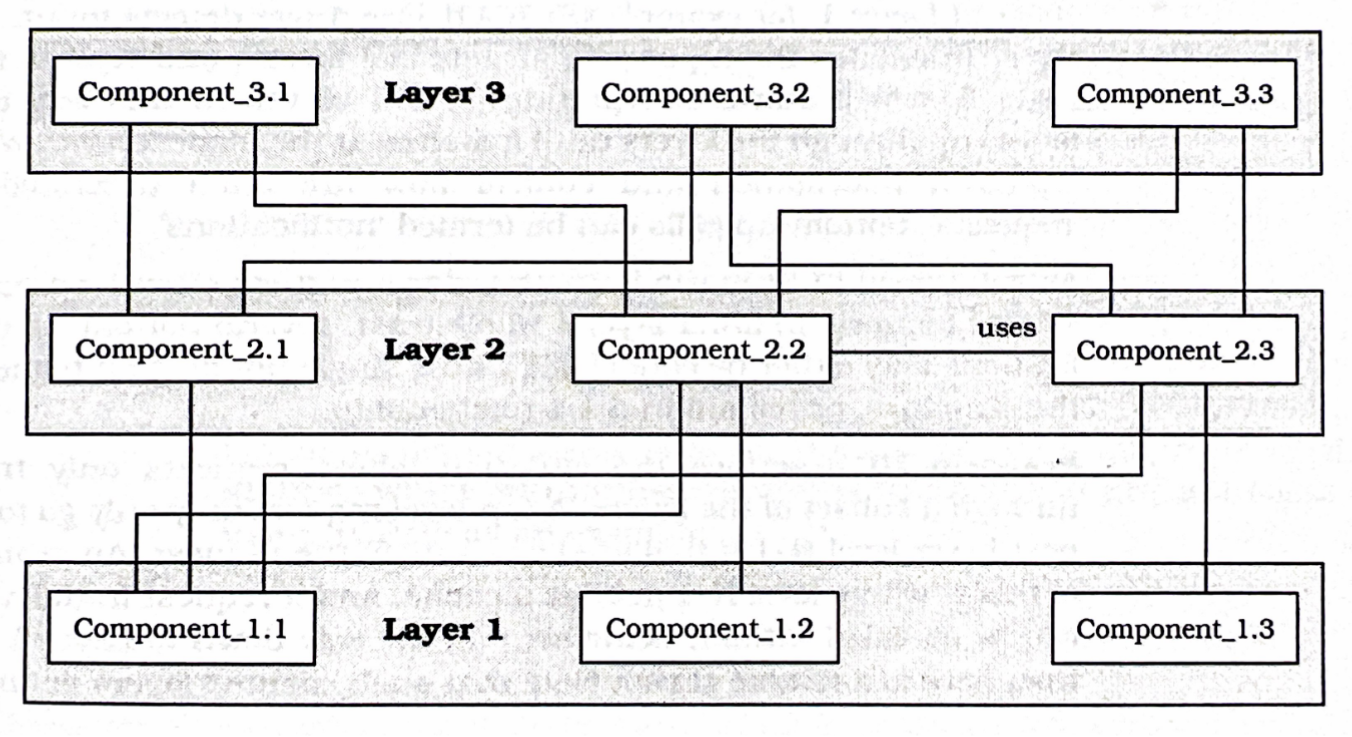
- Define abstraction criterion for layering
- Determine number of abstraction levels
- Name layers, assign tasks to each of them
- Specify the services
- Refine the layering (iterate over steps 1 - 4)
- Specify an interface for each layer (protocols)
- layer should be a black box for layer
- Structure the individual layers
- Specify the communication between layers (push or pull)
- Decouple adjacent layers (use callbacks, commands, events, etc.)
- Design an error-handling strategy
Pros
- Reuse of layers
- Support for standardization
- Exchangeability: e.g. installation of new graphics driver
- Dependencies kept local
Cons
- Cascades of changing behavior
- Lower efficiency
- Unnecessary work: e.g. packing and unpacking
- Difficult to establish correct granularity of layers
- Too many layers: unnecessary complexity and overhead
- To few layers: does not fully exploit pattern’s potential
Variants
- Relaxed layers: Layer communicates with layers through
- higher flexibility and performance
- loss of maintainability
- Layering through inheritance:
- class of layer is a subclass of layer class
- higher layer can modify lower-layer services
- higher coupling between layers (fragile base class problem)
Model-View-Controller
The Model-View-Controller architectural pattern (MVC) divides an interactive application into three components:
- The model contains the core functionality and data
- Views display information to the user
- Controllers handle user input
- Views and controllers together comprise the user interface. A change-propagation mechanism ensures consistency between the user interface and the model
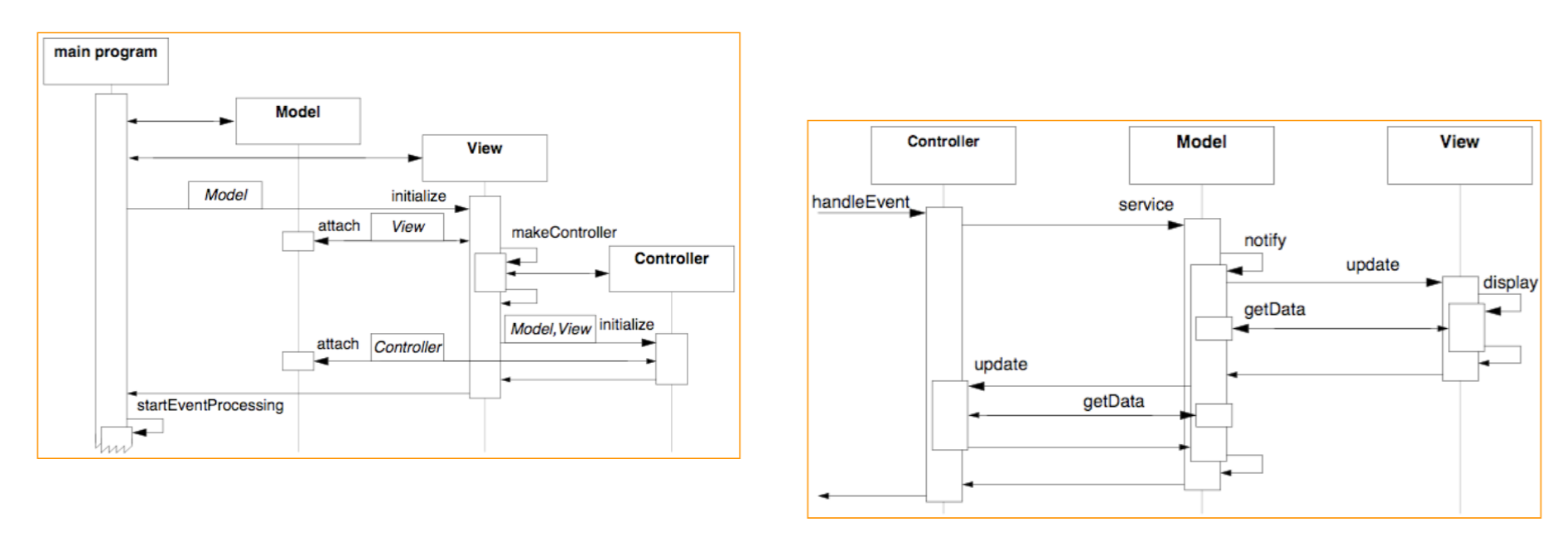
Model:
- Provides functional core of the application
- Registers dependent views and controllers
- Notifies dependent components about data changes
- Collaborators: View, Controller
View:
- Creates and initializes its associated controller
- Displays information to the user
- Implements the update procedure
- Retrieves data from the model
- Collaborators: Model, Controller
Controller:
- Accepts user input as events
- Translates events to service requests for the model or displays request for the view
- Implement the update procedure if required
- Collaborators: Model, View
Pros
- Multiple views of the same model
- synchronized / consistent views via change propagation
- Pluggable views and controllers
- Exchangeability and portability of look-and-feel
- Framework potential
Cons
- Increased complexity
- Potential for excessive number of updates
- Intimate connection between view and controller (and model!)
- Inefficiency of data access in views
- Changes to view and controller when porting
- Does not always fit to modern GUI builder tools (top-down vs. bottom-up)
- MVC starts with data model, modern GUI often begins with interface design
Pipes and Filters
The Pipes and Filters architectural pattern provides a structure for systems that process a stream of data
- Each processing step is encapsulated in a filter component
- Data is passed through pipes between adjacent filters
- Recombining filters allows you to build families of related systems
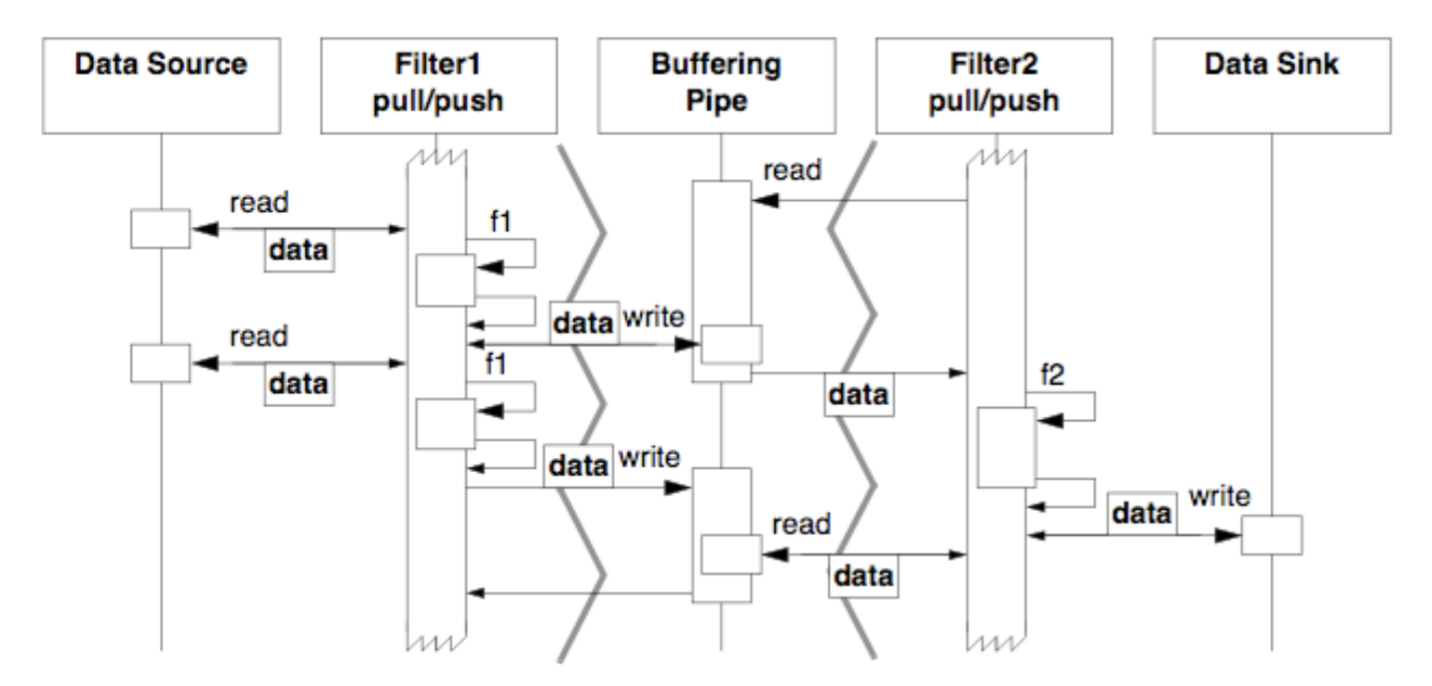
Filter:
- Gets input data
- Performs a function on its input data
- Supplies output data
- Collaborators: Pipe
Pipe:
- Transfers data
- Buffers data
- Synchronizes active neighbors
- Collaborators: Data Source, Data Sink, Filter
Data Source:
- Delivers input to processing pipeline
- Collaborators: Pipe
Data Sink:
- Consumes output
- Collaborators: Pipe
Pros
- Modularization: local changes within filters
- Reusability: filters in different pipelines
- Extensibility: adding new filters to the system
- Flexibility: recombining filters for new task
- Efficiency: potential multi-processing
Cons
- Inefficiencies: eliminating global state between filters, passing additional data through the pipes
- Multi-processing: naive use of incremental implementation may break multi-processing
- Error handling: problematic if one filter crashes the whole pipeline
CRC-Cards
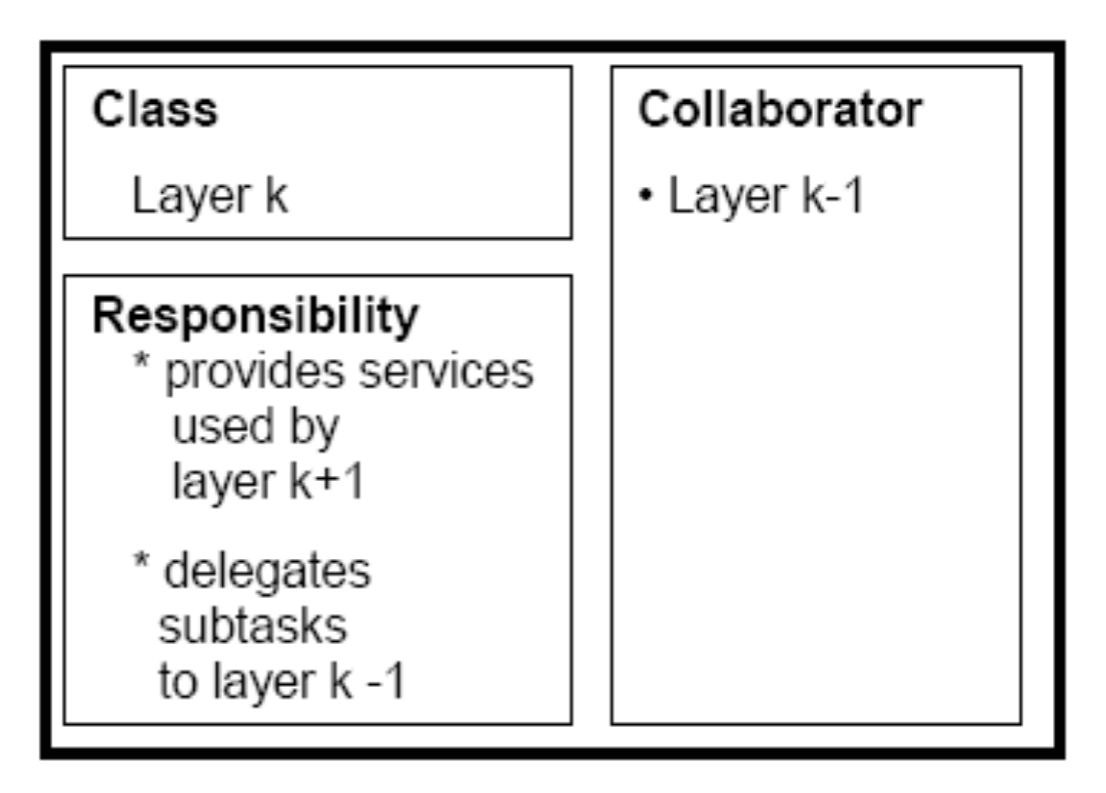
Class-responsibility-collaboration cards are a brainstorming tool used in the design of object-oriented software usually created from index cards
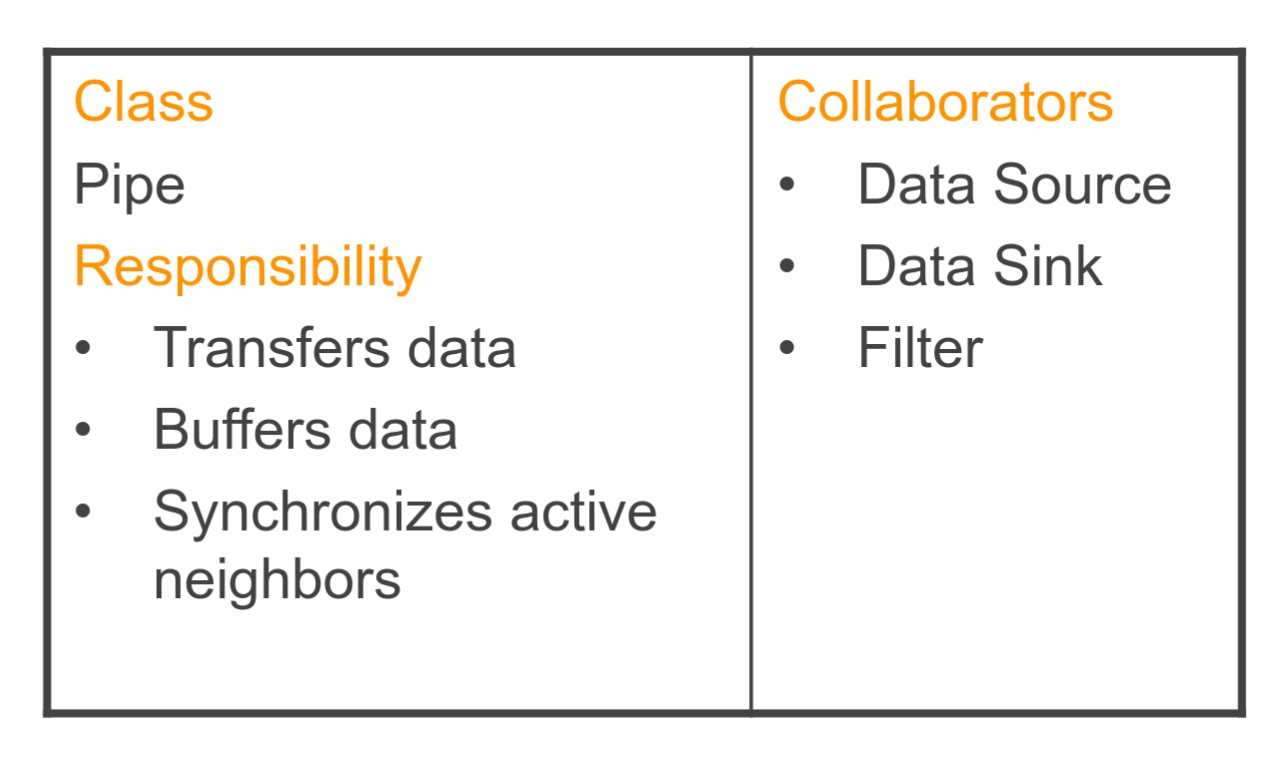
- On top of the card, the class name
- On the left, the responsibilities of the class
- On the right, collaborators (other classes) with which the class interacts to fulfill its responsibilities
CRC cards are frequently employed during the design phase of system and software development to transition use-case descriptions into class diagrams, allowing a smoother transition with a greater overview and permitting developers to implement solutions with low binding and high cohesion
Frameworks
A framework is the design for an application or subsystem
- A set of abstract classes and the way objects in those classes collaborate (Ralph E. Johnson)
- Object-oriented: A collection of cooperating classes that together define a generic or template solution to a family of domain specific requirements
- Dictate overall structure of a family of applications
- partitioning into components + their responsibilities and interaction
- Make intensive use of Template Methods for modeling hot-spots in a design
- application-specific details filled in during instantiation (customization)
- Design reuse (domain concepts) + Implementation reuse (instantiate concrete and inherit abstract classes)
A framework defines:
- A model of some domain (or aspect thereof)
- The abstract design of this model as a set of interfaces
- The space of possible run-time object configurations
- The object coupling on an abstract level
- The allowed control flow between objects
- The distribution of responsibilities between classes
- Possible implementations and the constrains thereon by means of a partial (abstract) implementation
- Generic reusable functionality
- A reuse skeleton and a reuse contract
Hollywood Principle
“Don’t Call US, We Will Call You”
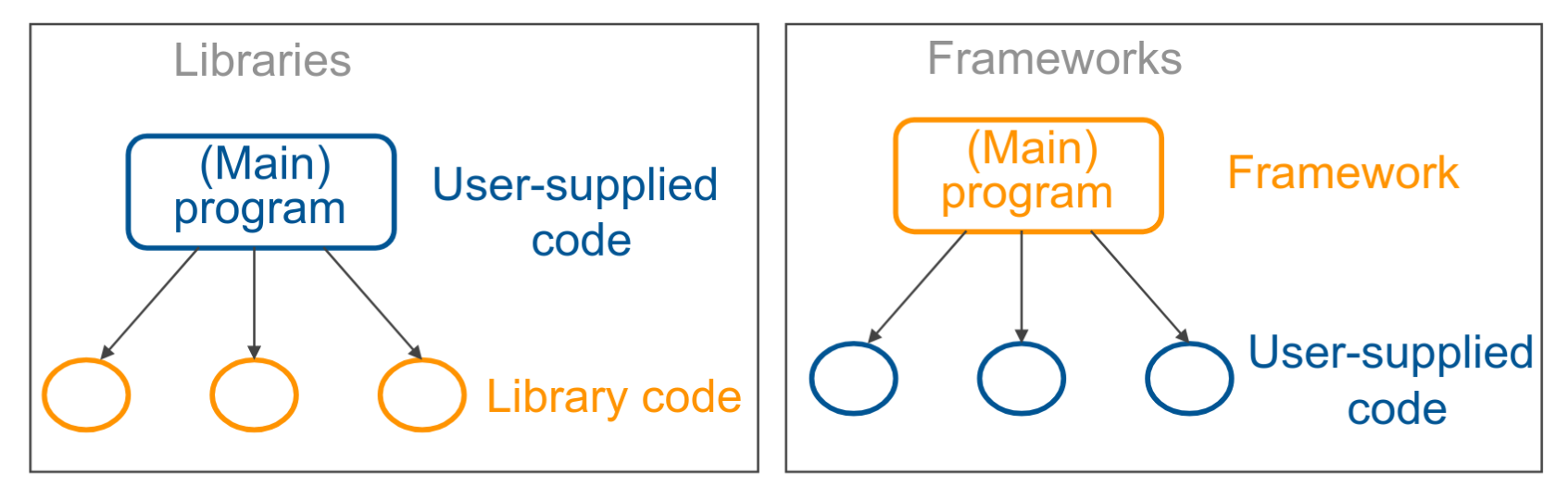
- inversion of control: framework coordinates sequencing of application activity
- communication between framework and application can be two-way, but typically is one-way
Patterns vs. Frameworks
- Patterns are smaller: usually multiple patterns in a framework
- Patterns are more abstract: frameworks provide implementations that can be reused as is
- Patterns are less specialized: Frameworks apply to specific application domain, patterns to any OO software system
White-box vs. black-box
White-box: Customized by subclassing existing framework classes and providing concrete implementations
- hooks within the framework’s hot-spot regions
- need to know the framework implementation in more detail
Black box: Customized through composition
- Filling in parameters or plugging together compatible components from a library of prefabricated components
- Prefabricated components: Existing framework classes which must be complete implementations of some interface in the abstract design
- Selection and parameterization often supported by tools
- Fixed number of choices foreseen by framework developers
Gray-box: Framework using both refinement / inheritance and parameterization
- Frameworks often evolve: white-box gray-box black-box
Framework Integration
Inversion of control:
- Workaround: one thread per framework
Integration with legacy code:
- Workaround: use Adapter design pattern
Architectural mismatches:
- Different models of integrated framework components
- Different interactions
- Different pragmatics (OO, Pipes and Filters, etc.)
Documenting a Framework
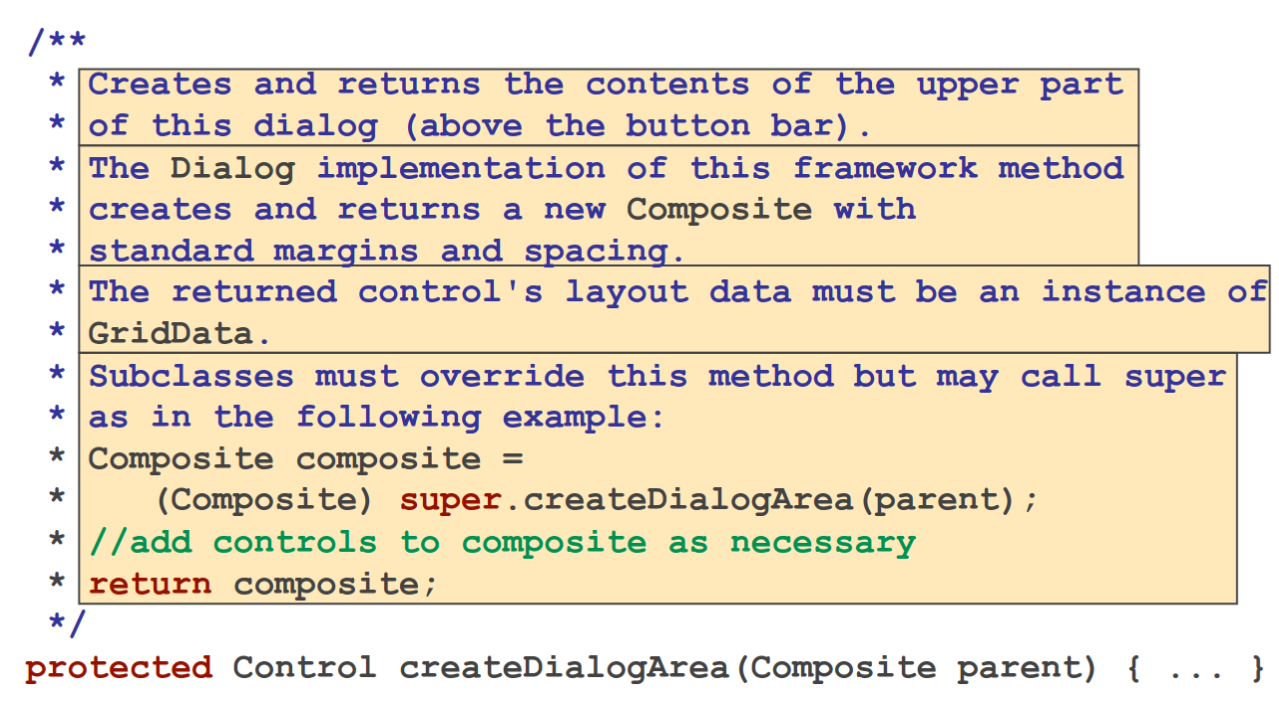
- Intention
- Default behavior
- Constraints
- Override instructions
About 80% of all framework projects fail - Grady Booch
Pattern Languages
Pattern language vs. collection of patterns
A set of patterns becomes a pattern language when each of its patterns, once solved, leads to more patterns that should then be considered.
- structured system of interconnected patterns, where each pattern is part of a larger, cohesive structure
- patterns within a language are often related in a way that the application of one pattern might lead to the use of another, creating a flow or network of solutions
- short: dynamic and interrelated set of patterns
- GoF patterns (Gang of Four / Design Patterns. Elements of Reusable Object-Oriented Software) is a collection, not a language
Null Object
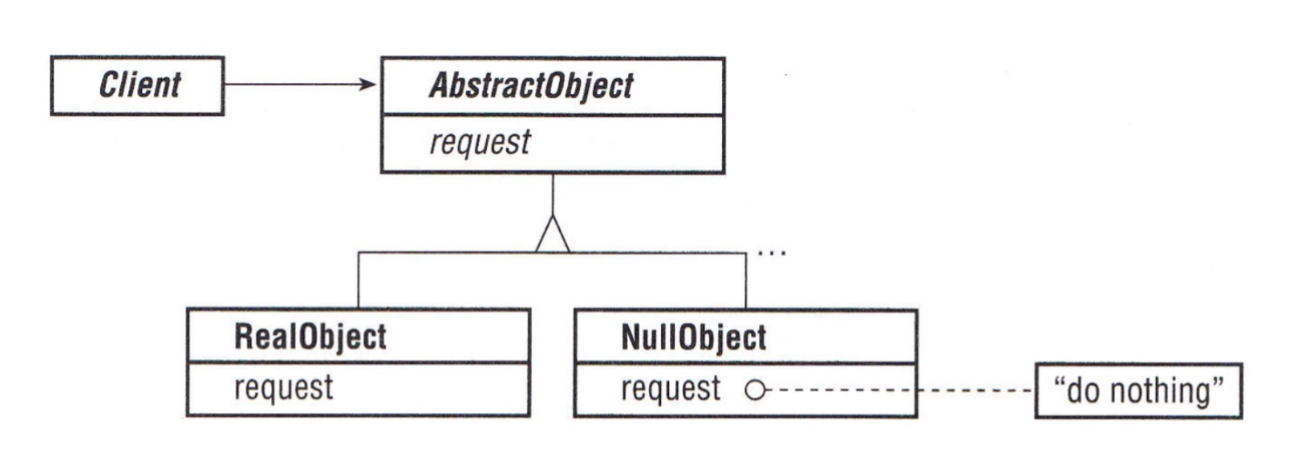
The Null Object provides a surrogate for another object that shares the same interface but does nothing
- encapsulates the implementation decision of how to “do nothing”
Pros:
- avoid nil check or conditionals in client
- easy to reuse and uniform
Cons:
- difficult to implement if clients do not agree on how to “do nothing”
- can necessitate a new Null Object class for every collaborating class
Implementation:
- implement as subclass to inherit interface
Extension Object
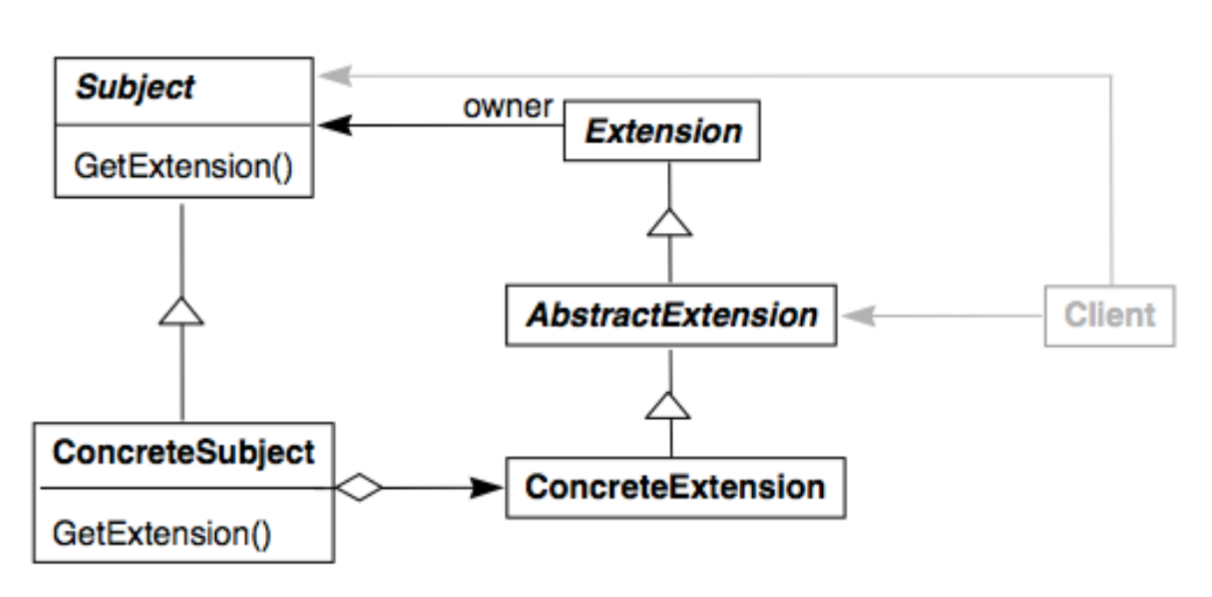
An extension object anticipates that an objects’s interface needs to be extended in the future
- The Extension Object pattern proposes to package the extended interface into a separate object
- Clients that want to use this extended interface can query whether a component supports it (e.g. named extensions)
- e.g. spell checker in editor
Pros:
- Avoids bloated class interfaces for key abstractions
- Supports modeling different roles of a key abstraction in different subsystems
Cons:
- Clients become more complex
- Extensions can be abused to model concepts that should be explicit (comprehensibility)
Implementation:
- Manage (create, know, etc.) extensions internally or externally (subject vs. client)?
- How to identify extensions?
- When to release / free an extension?
Half-Object + Protocol (HOPP)
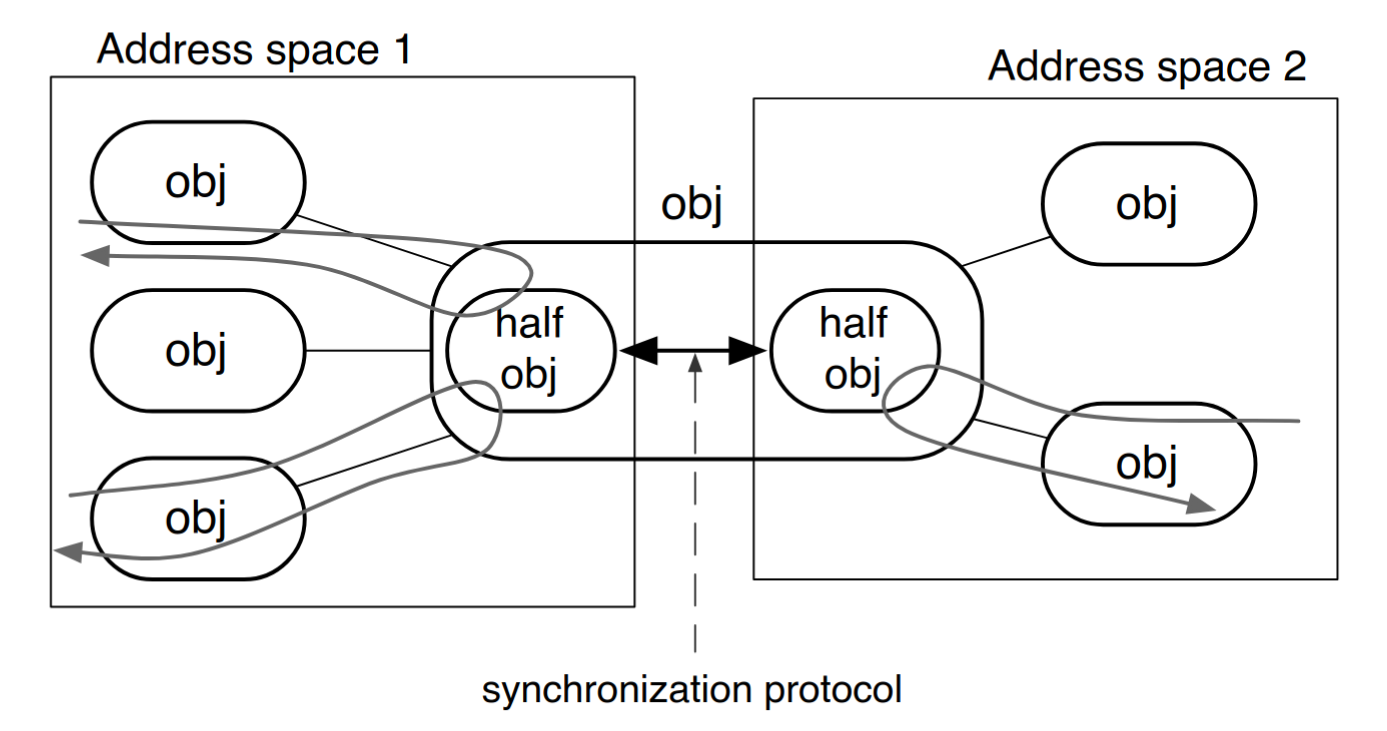
The HOPP pattern makes it possible for an object to appear in more than one computing context transparently
- object is divided into interdependent half-objects with a protocol between them
- transparently: hides distribution boundary. preserves identity and provides same interface in each computing context (e.g. address space)
Implementation:
- implement required functionality in each computing context
- this may result in duplicated functionality
- define the protocol so that activities between half-objects are coordinated and state is synchronized
- keep the state in a single address space and forward requests or
- split object in equal parts to respond to local requests without accessing other computation contexts