Security
A system is secure if resources used and accessed as intended under all circumstances (unachievable)
- Safety: A system does not cause harm to it’s environment
Security Violation Categories
- Breach of confidentiality (unauthorized data read)
- Breach of integrity (unauthorized data modification)
- Breach of availability (unauthorized data destruction)
- Theft of service (unauthorized use of resources)
- Denial of service (DOS)
Security Violation Methods
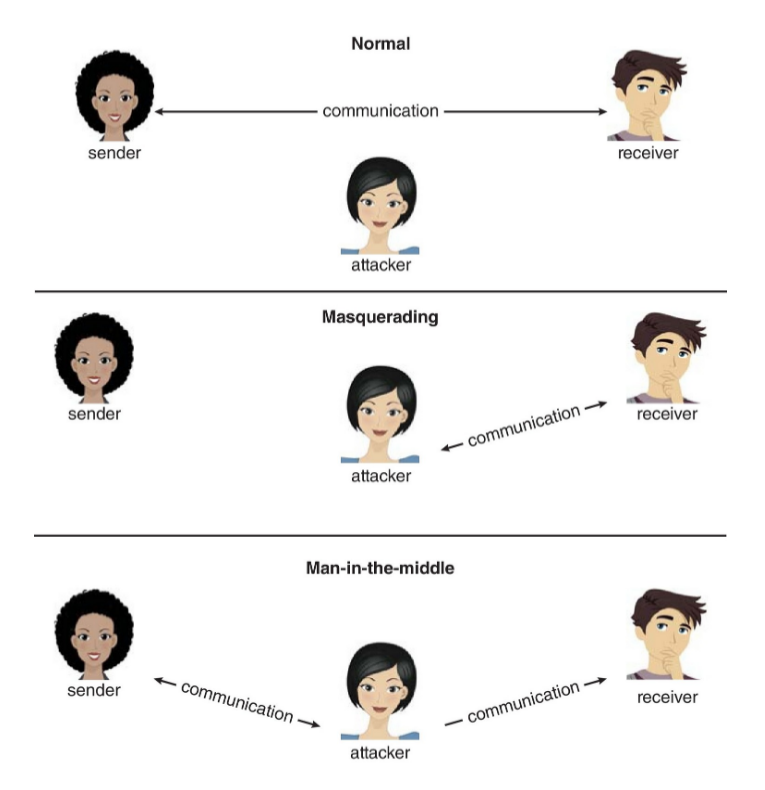
- Masquerading (breach authentication)
- Replay attack (resend original or modified message)
- Man-in-the-middle attack (masquerading as sender to receiver and vice versa)
- Session hijacking (intercept of already-established session)
- Privilege escalation (access beyond intended)
- Principle of Least Privilege: Every program and every privileged user of the system should operate using the least amount of privilege necessary to complete the job
Security Measure Levels
- Application
- Operating System
- Network
- Physical
Program Threats
- Malware: Software designed to exploit, disable, or damage computer
- Trojan Horse: Program, that hides a malicious subprogramm
- Spyware: captures user data
- Ransomware: locks up data via encryption, demands payment
- Trap Door / Backdoor: Specific user id or password, that circumvents normal security procedures
- Logic bomb: acts malicious as soon as some event (e.g. date) has occured
- etc.
- Code Injection: System code is not malicious, but has bugs allowing executable code to be added or modified
- Buffer overflow can be used to overwrite return address (trampoline)
- Possible Protection for buffer overflows: disable stack or page execution
- Virus: Embedded in legitimate program
- self-replicating, designed to infect other computers
- Virus Dropper: Inserts virus onto the system
- Worms: similar to viruses, distribution over networks
Attack Methods
- Port scanning: Automated attempt to connect to a range of ports on one or a range of IP addresses
- detection of answering service protocol
- detection of OS and version running on system
- frequently launched from zombie systems (decrease trace-ability)
- Denial of Service: Overload the targeted computer preventing it from doing any useful work
- e.g. Distributed Denial-of-Service (DDos): come from multiple sites at once
- might also happen accidentally or due to high legitimate traffic
Cryptography
- broadest security tool available
- source and destination of messages on network cannot be trusted without cryptography
- based on secrets (keys)
Encryption
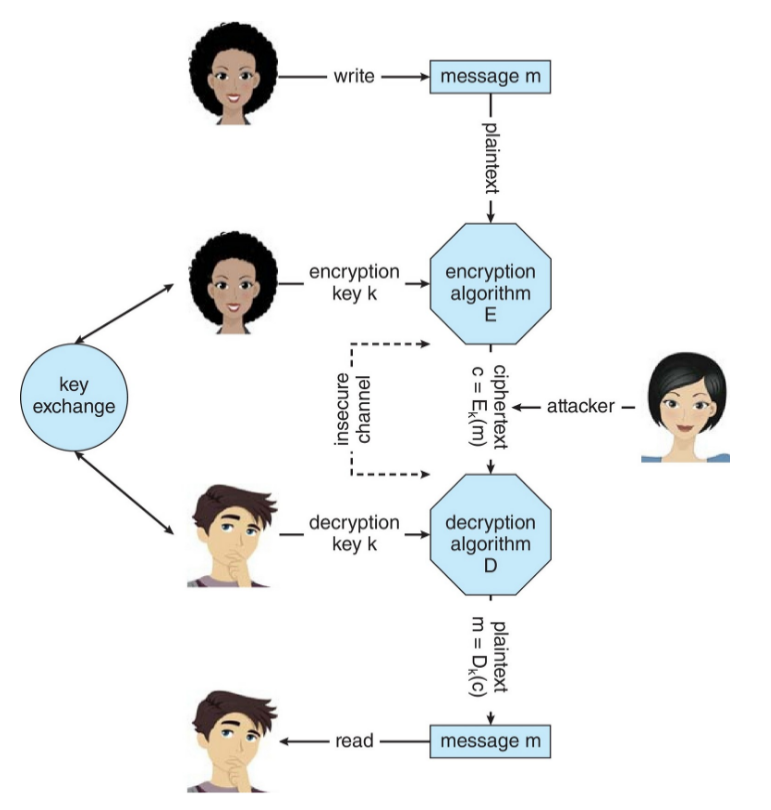
Encryption algorithm : Given a cyphertext , a Computer can compute such that only if it possesses the key
- Symmetric: Same key used to encrypt and decrypt
- based on transformations (fast)
- plaintext encryption cyphertext
- a secure medium is needed to exchange key, only then communication via insecure channels is possible (out of band)
- Asymmetric: Each user has two keys: public (used for encryption) and private (known to only individual user, used for decryption)
- based on mathematical problems functions (slow)
- problem with no efficient algorithm, but easily verifiable solution
- can be stored on key ring
- man-in-the-middle-attack still possible
- based on mathematical problems functions (slow)
Authentication
Constraining set of potential senders of a message (complementary to encryption)
- for a message a computer can generate an authenticator such that only if it posses
- subset of encryption (authenticators shorter than message, confidentiality might not be needed)
- can prove message to be unmodified
- hash functions are basis for authentication, but not useful as authenticators
- Message-authentication code (MAC): Cryptographic checksum generated from message using secret key
- can securely authenticate short message, long messages can be hashed
- whoever can verify authenticators can also generate them
- Digital Signature: inversion of asymmetric encryption
- based on public and private key
- anyone can verify authenticity
- Digital Certificates: proof who or what owns a public key
- Certificate authority: trusted party, digitally sign public keys
Passwords
- only encrypted passwords stored (hash function with salt), but still kept secret
- one-time password can be generated by the computer
- can be replaced with biometrics
- can be extended to multi-factor authentication
Example: TLS
- used in transport layer
- encryption can be implemented at various layers (depending on knowledge needed)
- also called SLL (Secure Socket Layer)
- used between web servers and browsers for secure communication (socket creation)
- establishes a secure session key (symmetric) using asymmetric encryption in the first place
Defenses
- signature based: spot known bad patterns
- anomaly detection: spot difference from normal behavior
- can also detect zero-day attacks
- sandboxing: execute untrusted programs in a VM
- avoid human error (educate users)
- keep software up to date and trusted (safe computing)
- encrypted file system protects data while OS is offline
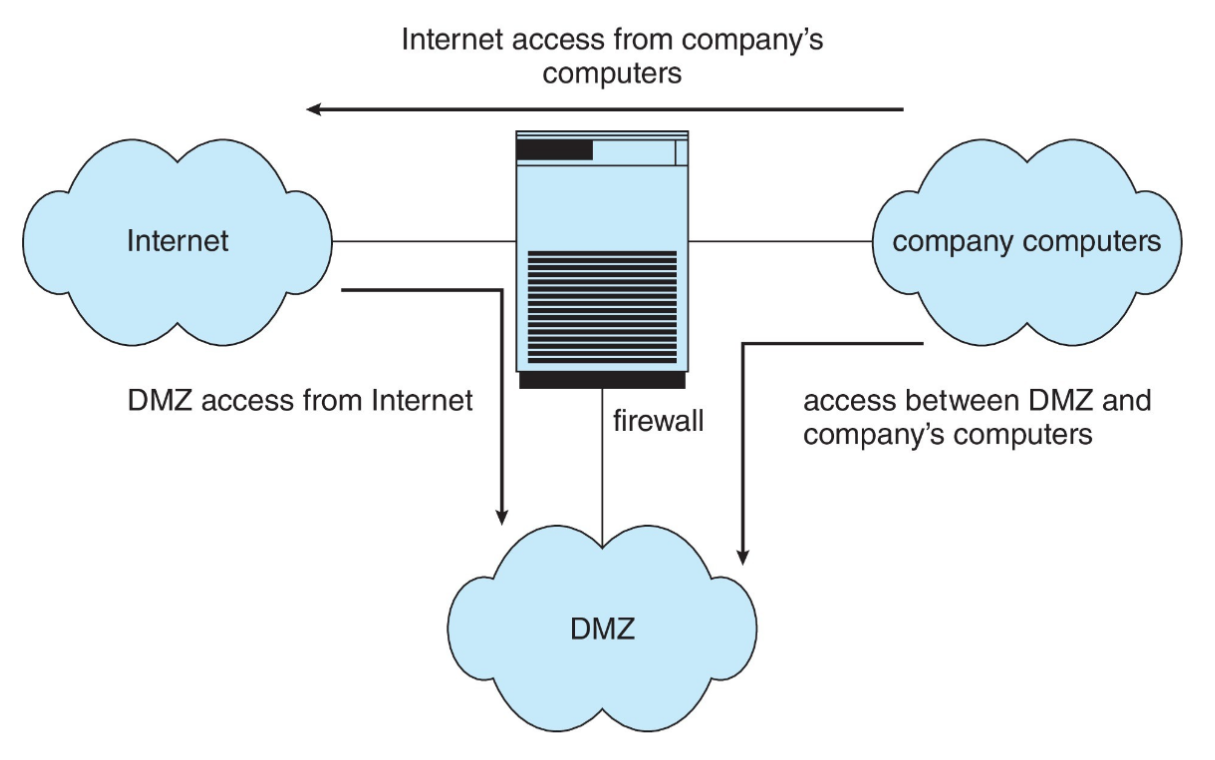
Firewall
- placed between trusted and untrusted hosts
- can be tunneled (disallowed protocol via allowed protocol) or spoofed (avoid IP address based rules by faking it)
Protection
Protection Problem: Ensure that each object is accessed correctly and only by those processes that are allowed to do so
- Guiding Principle: principle of least privilege
- Domain can be user, process, procedure, etc.
- Audit trail: recording all protection-orientated activities what happened? what wasn’t supposed to happen?
- Need to know principle: Process should only have access to objects it needs to complete its task
Protection Rings
- Components ordered by amount of privilege and protected from each other
- e.g. kernel ring and user application ring
- subset relation
- Gates used to transfer between levels
- Privilege escalation also possible through traps and interrupts
Domain of Protection
- Each domain specifies set of objects and types of operations on them
- Ability to execute an operation on an object is an access right
<object-name, right-set>- e.g.
<O_1, {read, write}>forD_1
- UNIX: Domain = user-id with ability to temporarily change user-id
- controlled by
setuidbit on executed file) sutemporarily switches to another user’s domain when password is providedsudoexecutes command in another domain (privilege or password needed)
- controlled by
Access Matrix
| owner execute | write | ||
| read* owner | read* owner write | ||
| execute |
ownercan always copy or remove right in other domains*denotes that this domain can copy its right to other domains- Domänen könne auch als Objekte betrachtet werden Wechsel in andere Domäne mittels
switch(kontrolliert durchcontrol)
Implementation
- Option 1: Global Table
- Store ordered triples
<domain, object, right-set>in table - could be too large
- Store ordered triples
- Option 2: Access list for objects
- per-object list consisting of
<domain, rights-set> - easily extended to contain default set
- per-object list consisting of
- Option 3: Capability list for domains
- per-domain list consisting of
<object, right-set> - inversion of access lists
- per-domain list consisting of
- Option 4: Lock-key
- each object has list of unique bit patterns, called locks
- each domain as list of unique bit patterns called keys
- process in a domain can only access object if domain has key that matches one of the locks
In practice most systems use combination of access lists and capabilities:
- First access: access list of the object is searched
- if allowed, capability created and attached to process
- Additional accesses: only local capability needs to be checked
- Last access: capability is destroyed
Further Access Control Mechanisms
- Role-based (RBAC): Users are assigned roles granting access to privileges and programs
- Mandatory (MAC): In contrast to discretionary access control (DAC), even root users can’t circumvent
- Capability-based: Fine grained control over privileged operations (e.g.
CAP_NET_RAWin POSIX)
Windows
Security Descriptors
Der Zugriff auf Objekte wird durch den Security Reference Monitor (SRM) überwacht
- Access Validation: besteht aus gewünschtem Zugriff, Token (Nutzer-SID, Gruppen-SIDs und Privilegien) und dem Security Descriptor des Objekts (DACL)
- Ein erfolgreicher Zugriff erzeugt eine Handle, die von zukünftigen Änderungen der security unberührt bleibt
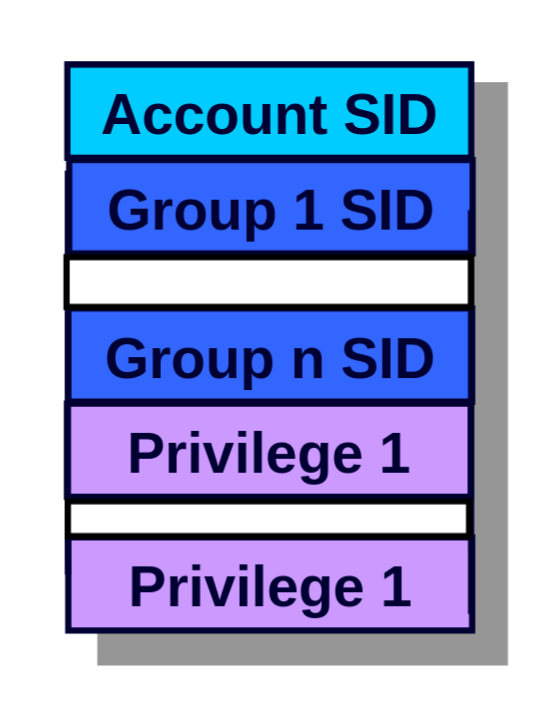
- Security Descriptor: werden den Objekten wie z.B. Dateien zugewiesen
- bestehen aus Owner-SID, Primary Group (POSIX), DACL-Pointer, SACL-Pointer
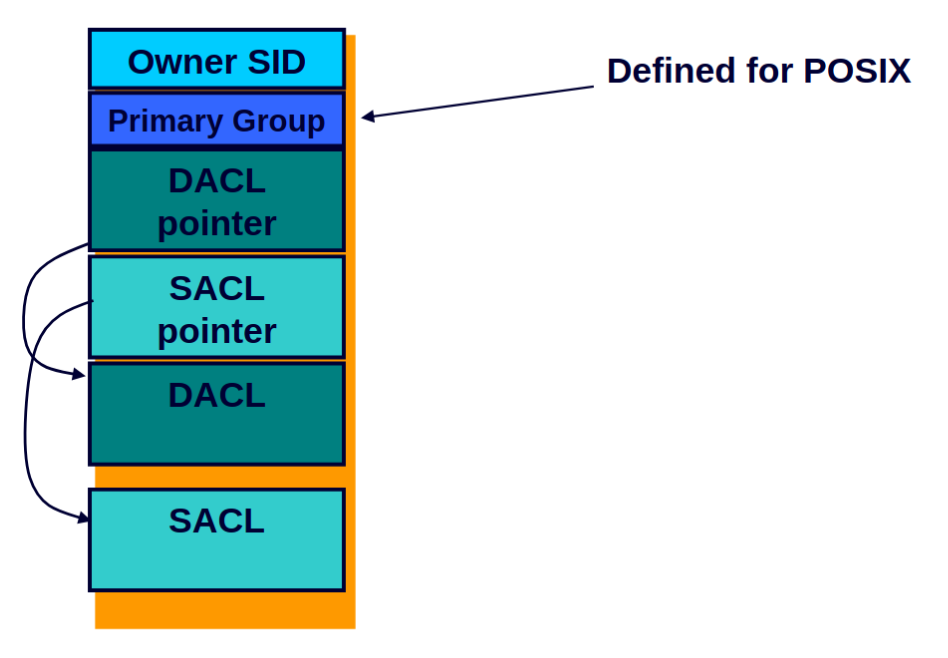
- Win32 Security: Nahezu allen teilbaren Objekten kann bei der Erstellung ein Security Attribute (Security Descriptor (+ Länge) + Inheritance) zugewiesen werden
- Access Control List (ACL): Sammlung von Access Control Entries (ACEs)
- Windows verwendet DACL für Zugriff-Schutz (First-Fit Algorithmus) und SACL für Auditing (Logging)
- Jedes Objekt kann bis zu 16 Access Types:
- z.B.
SYNCHRONIZE,WRITE_OWNER,WRITE_DAC,READ_CONTROL,WRITE_CONTROL,DELETE,FILE_GENERIC_READ,FILE_GENERIC_WRITE,FILE_GENERIC_EXECUTE
- z.B.
- Security Descriptor ohne DACL erlaubt alle Zugriffe, ansonsten müssen
DENY- undALLOW-Einträge geprüft werden - Take-Owner-Privilege: bevor die DACL geprüft wird, wird
WRITE_OWNER-Zugriff erteilt- Privilegien können Nutzern oder Gruppen zugeordnet werden
- Privilegien sind standardmäßig deaktiviert und müssen programmatisch mittels System call aktiviert werden
- Backup-Privilege: kann jede Datei lesen
- Restore-Privilege: kann jede Datei schreiben
- Debug-Privilege: kann jeden Prozess öffnen, lesen und modifizieren
- Load Driver: kann beliebige Treiber (Kernel-Code) laden
- Create Token: kann sich als beliebiger Nutzer ausgeben
- etc.
- Caller is owner:
READ_CONTROLundWRITE_CONTROLwerden erteilt, mit denen sich der Security Descriptor lesen und verändern lässt
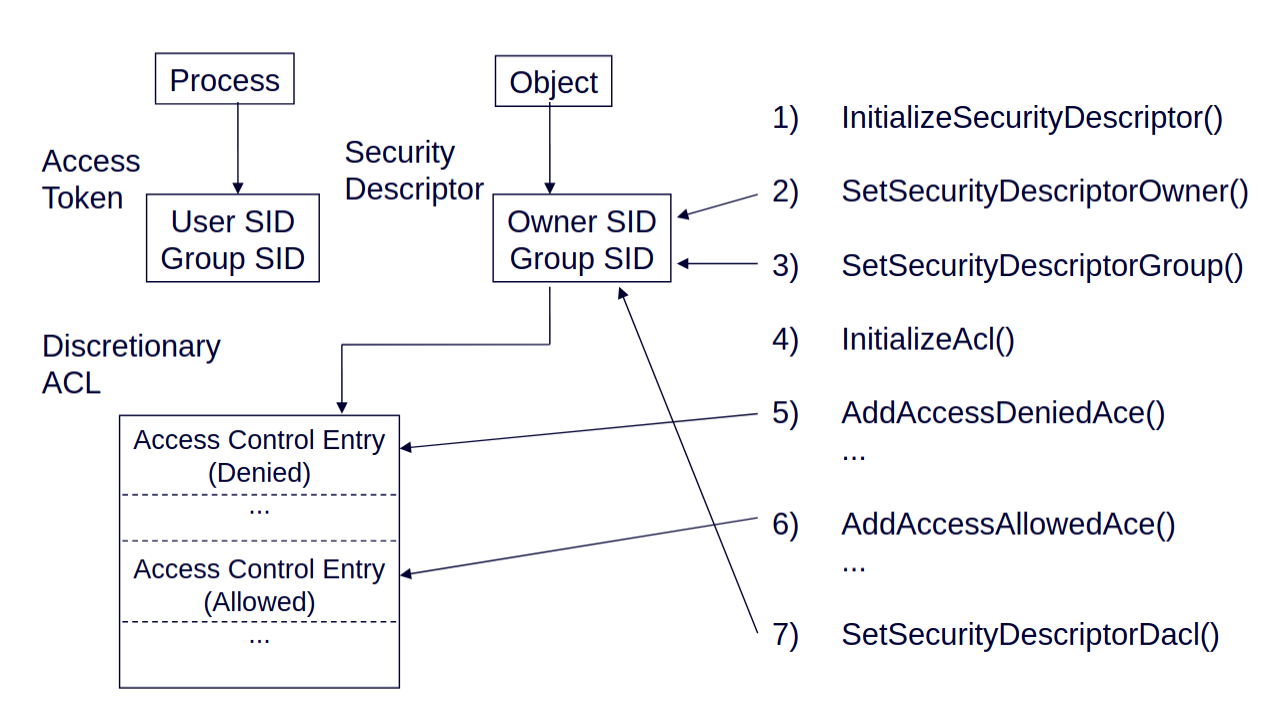
- Auditing: Kann genutzt werden, um Zugriffe auf Objekte zu dokumentieren
- Anlegen einer SACL genügt nicht, ein Administrator muss das Auditing im Local Security Policy Editor aktivieren
- Impersonation: Wird bei Server-Anwendungen genutzt, um dad Sicherheits-Profil eines anderen Nutzers einzunehmen
- Threads können Access Token des Prozesses verwenden oder ein eigenes Token zur Impersonation halten
Security Services
- Permission can be applied to all shareable resources (NTFS but not FAT file system)
- each object has a security descriptor (owner ID, group security ID, DACL, SACL)
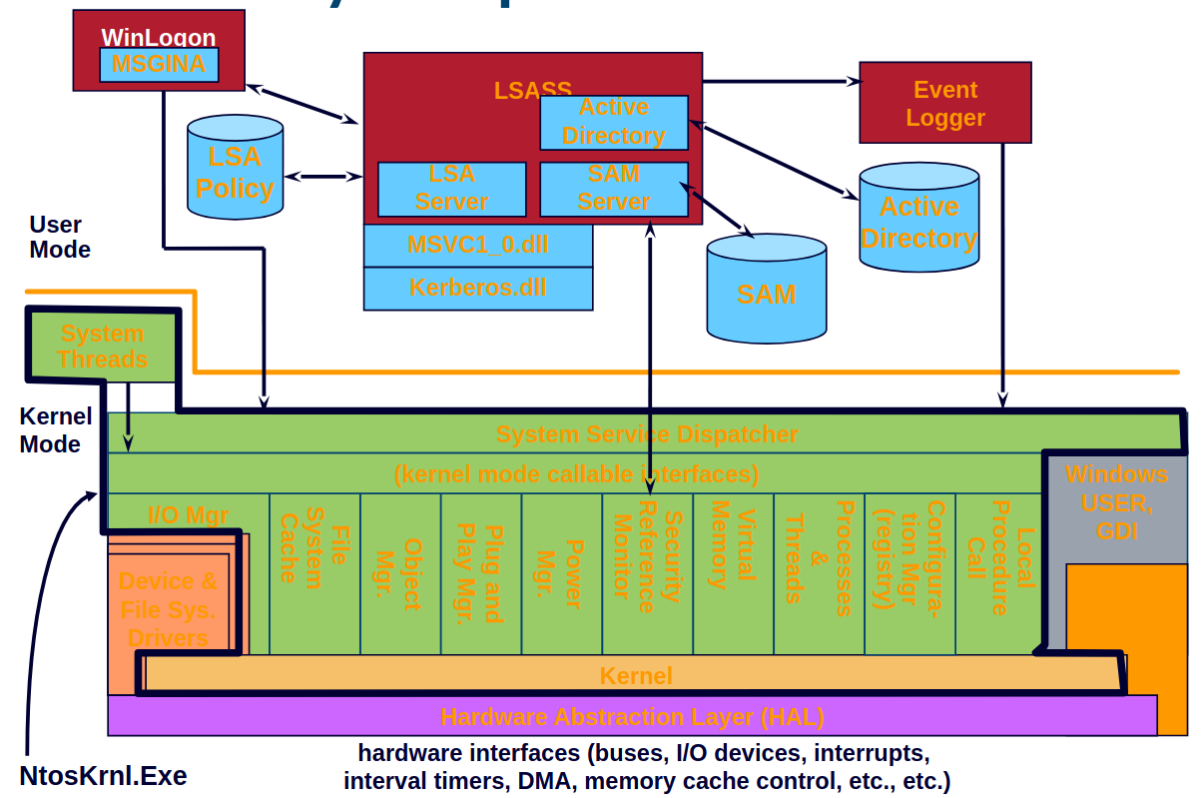
- Local Security Authority (LSA) runs as local user-mode process
- implements policies (e.g. password, logon, authentication, logs)
- another LSA on domain controller (network)
- Security Reference Monitor running in Kernel
- Security Accounts Manager (SAM): manages database of users and passwords
- Active Directory: contains a database storing information about domain objects
- Net Logon: responds to network logon request, handled as local logon via LSASS authentication service
- Winlogon: manages user sessions
- GINA: graphical identification and authentication