Extreme Programming - XP (Beck)
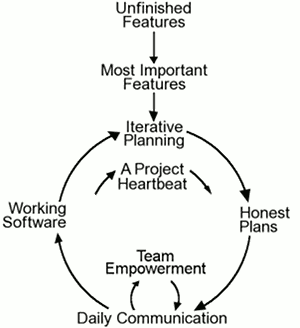
Values:
- Communication: everyone is part of the team and we communicate face to face daily. We will work together on everything from requirements to code
- Clear information
- Simplicity: do what is needed and asked for, but no more
- Clear thinking
- Feedback: take every iteration commitment seriously by delivering working software. We demonstrate our software early and often then listen carefully and make any changes needed, including adapting the process
- Well-informed decisions
- Courage: tell the truth about progress and estimates. We don’t document excuses for failure because we plan to succeed. We don’t fear anything because nobody ever works alone
- Bias towards action, but wait until the problem is understood
- Respect: everyone gives and feels the respect they deserve. Management respects our right to accept responsibility and receive authority over our own work
- Incentive to act
Principals:
- Humanity
- Economics
- Mutual Benefits
- Self-Similarity
- Diversity
- Improvement
- Flow
- Opportunity
- Redundancy: “Given enough eyeballs, all bugs are shallow”
- Failure
- Quality
- Baby Steps
Rules
Planning:
- User stories are written
- Release planning creates the release schedule
- Make small releases
- Release frequently
- The project is divided into iterations
- Iteration planning starts each iteration
Managing:
- Give the team a dedicated open work space
- A stand up meeting starts each day
- Set a sustainable pace
- The Project Velocity is measured
- Move people around (skill-knowledge sharing)
- Fix XP when it breaks
Design Rules:
- Simplicity
- Choose a system metaphor
- Use CRC cards for design sessions
- Create spike solutions (prototype) to reduce risk
- No functionality is added early
- Refactor whenever and wherever possible
Testing Rules:
- All code must have unit tests
- All code must pass all unit tests before it can be released
- When a bug is found tests are created
- Acceptance tests are run often
Coding Rules:
- The customer is always available
- Code must be written to agreed standards
- Code the unit test first
- All production code is pair programmed
- Only one pair integrates code at a time
- Integrate often
- Set up a dedicated integration computer
- Promote collective ownership practice
Theory of Constraints
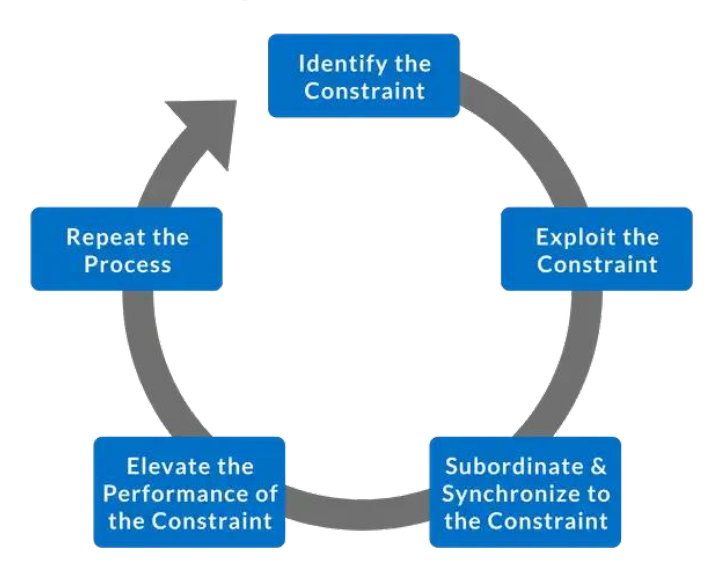
- Identify: Find the single part of the process that limits the rate at which the goal is achieved
- Exploit: Quick improvements to the throughput of the constraint using existing resources
- Subordinate: Review all other activities in the process to ensure that they are aligned with and truly support the needs of the constraint
- Elevate: If the constraint still exists (i.e. it has not moved), consider what further actions can be taken to eliminate it from being the constraint
- Repeat: Monitor to find next opportunity for improvement
Can be applied to Agile
Software Reuse
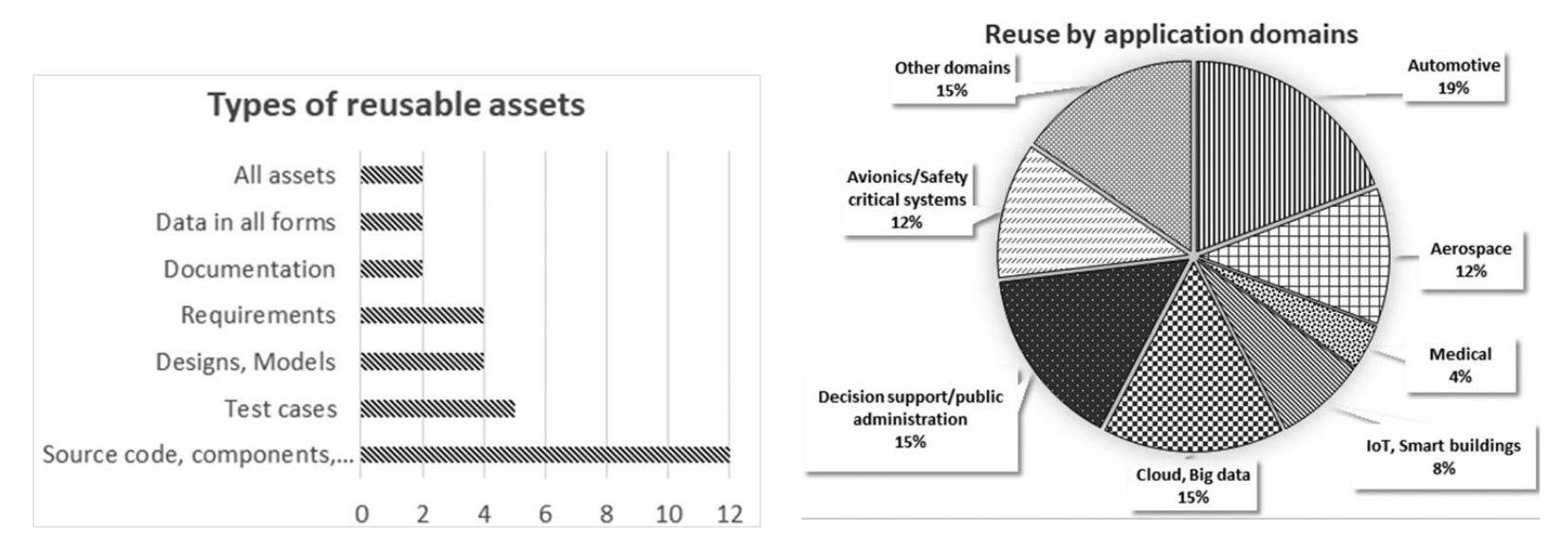
Modes of Reuse:
- Design Reuse: prescriptive models, e.g. software architecture
- Code Reuse: source code (whitebox), APIs (blackbox)
- Process Reuse: models of production and distribution and their artifacts
Design Reuse
Pros:
- Early identification (before coding starts)
- Can mitigate the impact of changes to the requirements of a software, because when developer doesn’t understand the reasons for how a source code is implemented, she might inadvertently introduce bugs
- Design search supported by Large Language Models
Cons:
- Difficult to estimate impact on cost and quality
- Difficult to identify opportunities for reuse
Code Reuse
Pros:
- Easy to estimate impact on cost
- Large pool of available code on public repositories and Q&A sites
- Improved search and generation using Large Language Models
Cons:
- Costly code modification to project and dealing with low code quality
- Risk of proliferating code clones
Process Reuse
Pros:
- More opportunities as a production system
- Quick adoption of tools, methods, and features
Cons:
- Challenge to manage reuse at multiple levels
- Challenging to align and evolve process reuse with local Agile practice
Open-Source Software Development
The Apache Server (Open-Source Software)
- Size of Development Comunity:
- Code Contributors: 400 individuals contributed code, with 182 contributing to 695 problem report (PR) changes and 249 contributing to 6092 non-PR changes
- Problem Reporters: 3060 individuals submitted 3975 problem reports, with 458 reports leading to code changes
- Work Distribution:
- Core Developers: The top 15 developers contributed over 83% of modifications (MRs), 88% of added lines, and 91% of deleted lines
- Defect Repairs: Wider participation was observed in defect repairs, with 66% of PR-related changes made by the top 15 contributors, compared to 83% for non-PR changes
- Defect Density:
- Post-release Defects: Apache had a defect density of 2.64 defects per thousand lines of code added (KLOCA), higher than commercial projects (0.1–0.7 defects/KLOCA)
- Pre-system Test Defects: Apache had lower defect density compared to commercial projects, suggesting fewer defects were injected during development
- Problem Resolution Time:
- 50% of problem reports were resolved within 1 day, 75% within 42 days, and 90% within 140 days
- Higher-priority problems (affecting core functionality) were resolved faster than lower-priority ones
- Resolution intervals improved over time, with faster resolution after January 1997
Code Ownership: No strict code ownership was enforced. Most files had contributions from multiple developers, indicating coordination through mutual trust rather than strict partitioning
Productivity: Apache core developers handled more modifications per year than developers in comparable commercial projects, despite being part-time volunteers.
Takeaways
These results highlight the effectiveness of the Apache development process, particularly in defect repair and productivity, while showing areas for improvement in post-release defect density.
Mozilla (Commercial Software Development)
Mozilla: includes the browser, development tools, and a toolkit, with some projects larger than the Apache server
Main differences:
- Managed by mozilla.org staff (12 members), most of whom are full-time and play support and coordination roles. Module owners and test team leaders have substantial responsibilities
- Enforced code ownership, with module owners responsible for approving changes
- Longer resolution intervals due to mandatory inspections and more structured processes
- Daily builds and monthly milestone releases are managed by a designated group at mozilla.org, with code freezes and critical problem resolution before milestones
- and more…
Grundlagen Qualitätsmanagement
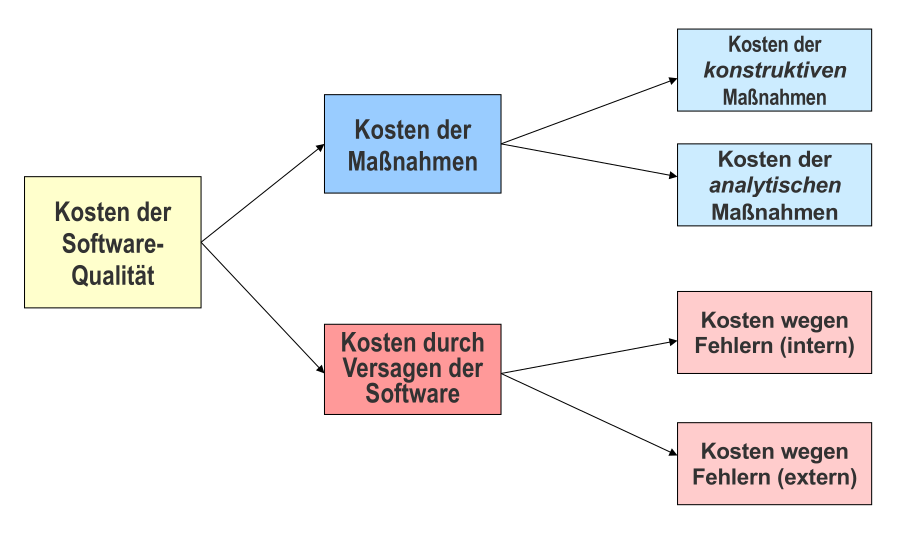
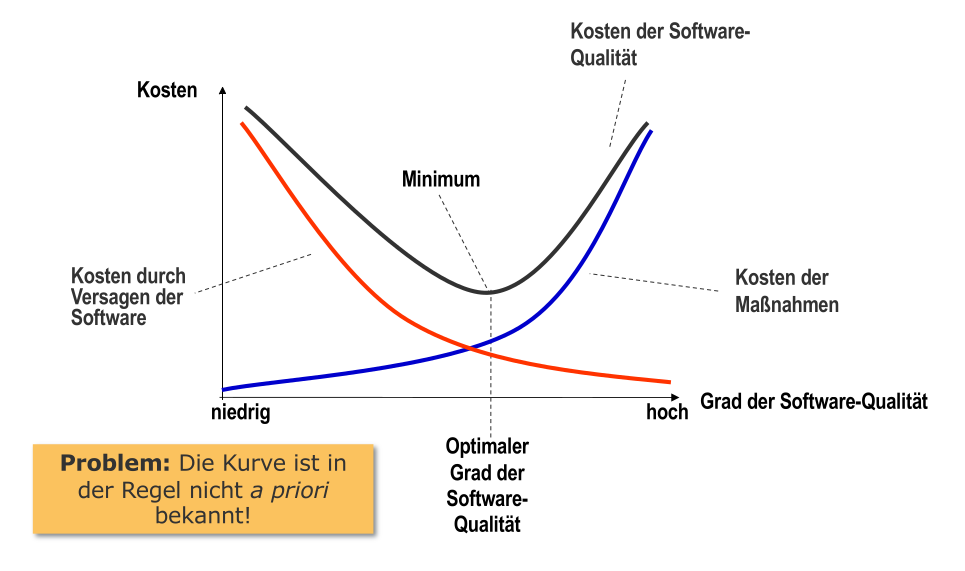
Qualitätsmanagement: Aspekt der Gesamtführungsaufgabe, welcher die Qualitätspolitik festlegt und zur Ausführung bringt
Konstruktive Qualitätssicherung
Ausrichtung der Entwicklungsabläufe auf Prävention durch Auswahl entsprechender Methoden, Sprachen und Werkzeuge
- Methoden: Entwicklungsmethoden und die unterlagerten Paradigmen: Module, Objektorientierung, Komponenten, Agenten
- z.B. Objektorientierung
- Sprachen: Geeignete Auswahl oder Einschränkung der Sprachen
- z.B. Typisierung | kein
goto - funktionale Charakteristika bestimmen wie wahrscheinlich Programmierfehler sind
- Verfügbarkeit von Werkzeugen beeinflusst Effektivität der einzelnen Aktivitäten
- Erfahrung im Entwicklungsteam ist dabei oft eine kritische Ressource
- z.B. Typisierung | kein
- Werkzeuge: Konfigurations- und Versionsmanagement, Computer-Aided Software Engineering Werkzeuge (CASE)
Analytische Qualitätssicherung
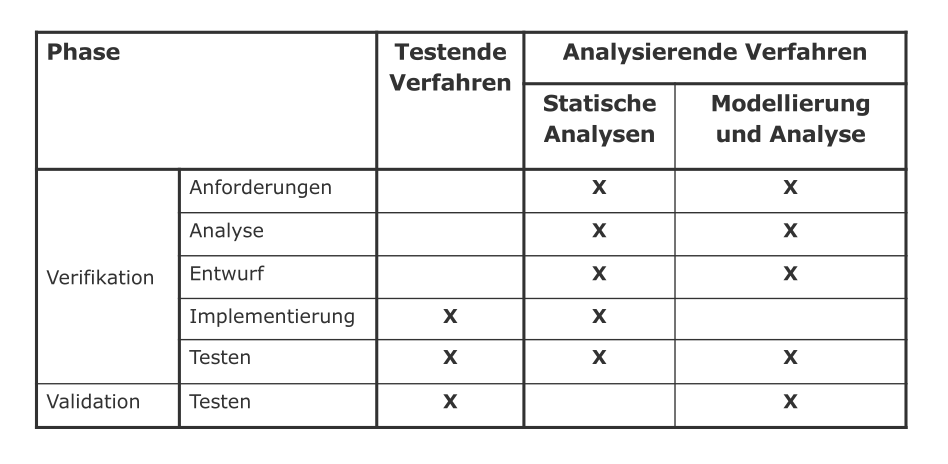
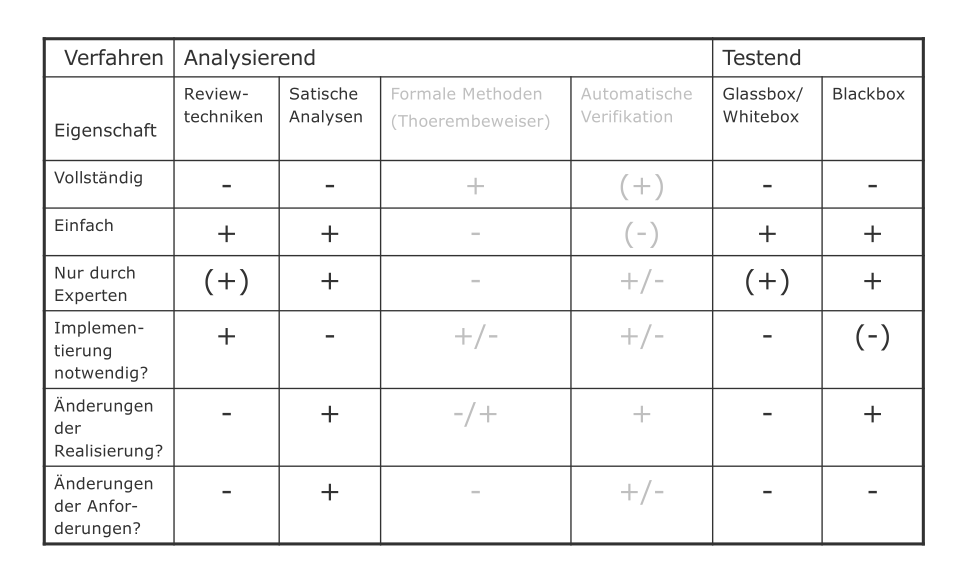
Analysierende Verfahren
Untersuchung ohne Ausführung
- Reviewtechniken: Artefakt systematisch in einem Team ansehen und besprechen (persönliche Reviews, Walkthroughs, Inspektionen, etc.)
- Automatische statische Analyse: Kontrollflussanalyse, Datenflussanalyse, etc.
- Modellierung und Analyse:
- Repräsentation der Zusammenhänge durch (mathematische) Modelle
- Modellierung zur Klarstellung / Verständnis
- Manuelle / automatische Analyse der Modelle
- Verifikation durch mathematische Analyse der Modelle | Validation durch Simulation der Modelle
Testende Verfahren
Ausführung der Systemkomponenten / Software
- Testen: Ausführen eines Programms mit der Absicht, möglichst viele Fehler zu finden
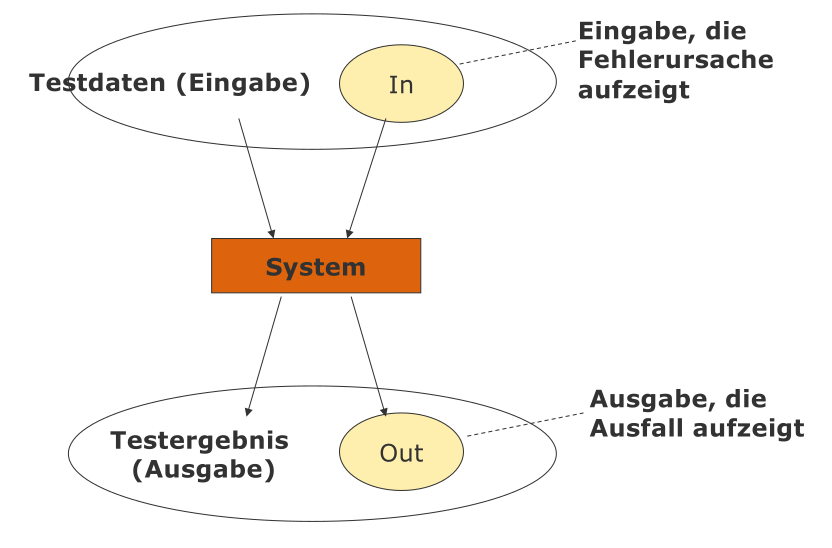
- Ausfall: Abweichung des Verhaltens eines Produkts / Programms (IST) vom erwarteten Verhalten (SOLL)
- Test: besteht aus Satz von Eingabedaten und erwartetem Ergebnis (SOLL)
Blackbox-Tests
ohne die Implementierung zu kennen | Fälle aus der Spezifikation
Funktionsortientierter Test:
- Funktion / Feature / Variable wird isoliert getestet
- Beginnt oft mit einfachen Tests, nimmt dann an Komplexität zu (auch mehrere Funktionen zugleich)
- sehr glaubwürdig und leicht zu evaluieren, nicht besonders leistungsfähig
Äquivalenzklassenbildung:
- Definitionsbereich der Variablen betrachten
- Reduktion aller möglichen Tests in eine kleine Anzahl an Gruppen mittels Partitionierung
- Auswahl von ein bis zwei Repräsentanten pro Gruppe
- insbesondere Randwerte einbeziehen
Regressionstest:
- Tests zur Wiederverwendung (bei jeder Programmänderung)
- durch Änderung entstandene Fehler sollen mit hoher Wahrscheinlichkeit aufgedeckt werden
Glassbox / Whitebox-Tests
anhand der Implementierung
Kontrollflusstesten: Kontrollflussgraphen irgendwie überdecken
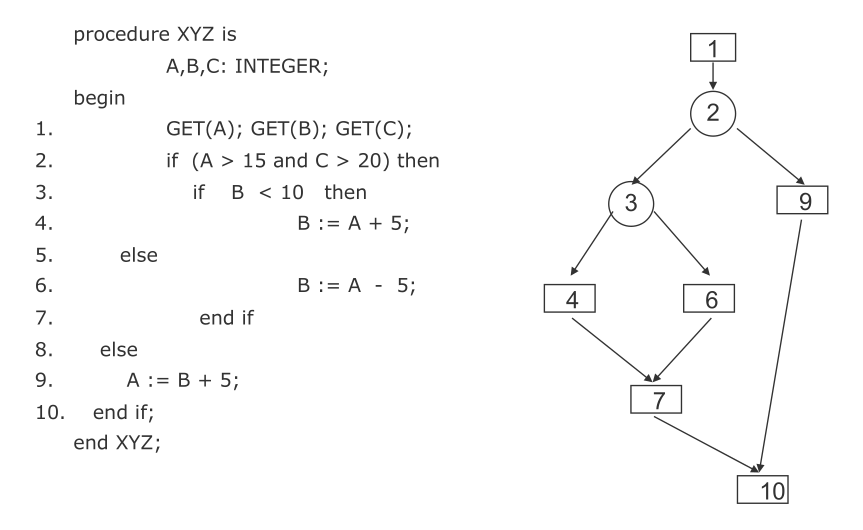
- Anweisungsüberdeckung: die Menge aller Tests wird so konstruiert, dass jede Anweisung minimal einmal ausgeführt wird
- Pfadüberdeckung: die Menge aller Tests wird so konstruiert, dass alle / einige Pfade überdeckt werden
- Problem: exponentielle Anzahl an möglichen Pfaden
- Lösung: möglichst überschneidungsfreie Pfade als Stichproben wählen und Schleifen ignorieren
Testaktivitäten
- Modultest (unit test): individuelle Komponenten werden unabhängig voneinander getestet
- Modul: kleinste unabhängig kompilierbare Einheit / was einzelne Person entwickelt
- Fokus: Datenstrukturen, Logik, Funktion, Interface
- Integrationstest: eine Gruppe abhängiger Komponenten wird zusammen getestet
- Fokus: Entwurf / Architektur, gemeinsame Funktionen, Interfaces / Interaktion
Kontinuierliche Integration
Continuous Integration
- bei jeder Code-Änderung im Repository: neues System bauen und testen
- Problem: fehlgeschlagene Tests blockieren auch andere Entwickler
- Lösung: Tests erst lokal laufen lassen, dann in gemeinsames Repository hochladen
Agiles Vorgehen beim Testen
Was wird getestet? Welche Quelle wird verwendet? Wer entwickelt / führt aus? Wo wird ausgeführt? Wann ist genug getestet (Testendkriterien)?
Scrum Master:
- Test organisieren
- Hinreichende Testinfrastruktur und -werkzeuge
- Hinreichende softwaretestspezifische Ausbildung
Sprint Planung:
- Testaufgaben entweder explizit über eigene Tasks geplant und überwacht oder implizit als Teil der Done-Kriterien anderer Aufgaben
Team:
- Teststrategie festlegen
- Test inhaltlich planen
- eine Person im Team sollte “hauptamtlich” für das Testen zuständig sein und über eine entsprechende Ausbildung und Erfahrung als professioneller Softwaretester verfügen
Testpyramide
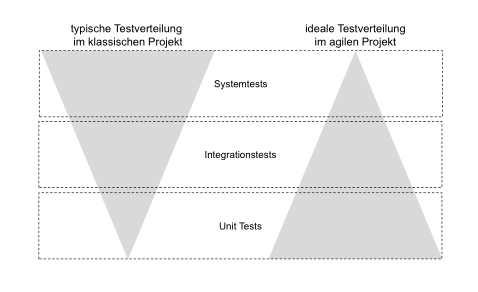
- Unit Tests: möglichst viele automatisierte Unit Tests erstellen, pflegen und einsetzen
- in klassischen Projekten fehlt Programmierern dazu Erfahrung / Motivation
- Integrationstests: die Laufzeit ist im Schnitt höher geringere Anzahl als die der Unit Tests
- Systemtests: noch aufwendiger möglichst wenige Testfälle
- in klassischen Projekten viele manuelle Systemtests durch unabhängige Systemtestgruppe
Integrationstests
- Sprint-Planung legt auch Integrationsreihenfolge vorab fest
- Aufwand für Entwurf, Automatisierung und Update der Integrationstests muss eingeplant werden
- Automatisierung aller Integrationstests ermöglicht kontinuierlichen Integrationsprozess
- also keine Blockade durch vorherige Integration
Akzeptanztests
- Übersetzung der Akzeptanzkriterien in Testfälle im Laufe des Sprints
- kann auch Unit-Test oder Integrationstests umfassen
- Akzeptanztest-getriebene Entwicklung: Akzeptanztests werden vor Implementierung der User Story erstellt
- auch Abnahmetest-getriebene Entwicklung
Systemtests
Herausforderung:
- in agilen Projekten meist geringer Automatisierungsgrad bei Systemtests
- hoher manueller Aufwand nötig
Strategien:
- Systemtests im “letzten” Sprint
- Systemtests am Sprint-Ende
- Systemtests nonstop (z.B. mittels nightly builds)